physdes.cts namespace
Submodules
physdes.cts.clk_tree3d_vis module
Clock Tree Visualization Module
This module provides functions to visualize clock trees generated by the DME algorithm using SVG format for clear, scalable graphics.
- class physdes.cts.clk_tree3d_vis.ClockTree3dVisualizer(margin=50, node_radius=8, wire_width=2, sink_color='#4CAF50', internal_color='#2196F3', root_color='#F44336', wire_color='#666666', text_color='#333333')[source]
Bases:
objectVisualizes clock trees in SVG format
- __init__(margin=50, node_radius=8, wire_width=2, sink_color='#4CAF50', internal_color='#2196F3', root_color='#F44336', wire_color='#666666', text_color='#333333')[source]
Initialize the visualizer with styling parameters
- Parameters:
margin (int) – Margin around the drawing
node_radius (int) – Radius of node circles
wire_width (int) – Width of wire lines
sink_color (str) – Color for sink nodes
internal_color (str) – Color for internal nodes
root_color (str) – Color for root node
wire_color (str) – Color for wires
text_color (str) – Color for text labels
Examples
>>> viz = ClockTree3dVisualizer(margin=10, node_radius=5)
>>> viz.margin
10
>>> viz.node_radius
5
- visualize_tree3d(root, sinks, filename='clock_tree3d.svg', width=800, height=600, analysis=None)[source]
Create an SVG visualization of the clock tree3d
- Parameters:
- Returns:
SVG string content
- Return type:
Examples
>>> from physdes.cts.dme_algorithm import TreeNode, Sink
>>> from physdes.point import Point
>>> s1 = TreeNode(name="s1", position=Point(Point(10, 0), 20))
>>> s2 = TreeNode(name="s2", position=Point(Point(30, 0), 40))
>>> root = TreeNode(name="n1", position=Point(Point(20, 0), 30), left=s1, right=s2)
>>> s1.parent = root
>>> s2.parent = root
>>> sinks = [Sink("s1", Point(Point(10, 0), 20)), Sink("s2", Point(Point(30, 0), 40))]
>>> viz = ClockTree3dVisualizer()
>>> svg = viz.visualize_tree3d(root, sinks, filename="", width=200, height=200)
>>> '<circle cx="75.0" cy="75.0"' in svg
True
>>> '<circle cx="125.0" cy="125.0"' in svg
True
>>> '<circle cx="100.0" cy="100.0"' in svg
True
- physdes.cts.clk_tree3d_vis.create_comparison_visualization(trees_data, filename='clock_tree3d_comparison.svg', width=1200, height=800)[source]
Create a comparison visualization of multiple clock trees
- Parameters:
- Returns:
SVG string content
- Return type:
Examples
>>> from physdes.cts.dme_algorithm import TreeNode, Sink
>>> from physdes.point import Point
>>> tree1 = TreeNode("root1", Point(Point(50,0), 50))
>>> tree2 = TreeNode("root2", Point(Point(150,0), 50))
>>> sinks = [Sink("s1", Point(Point(10,0), 20)), Sink("s2", Point(Point(30,0), 40))]
>>> analysis = {"skew": 0.1, "max_delay": 5.0, "total_wirelength": 100}
>>> data = [
...     {"tree": tree1, "sinks": sinks, "analysis": analysis, "title": "Linear Model"},
...     {"tree": tree2, "sinks": sinks, "analysis": analysis, "title": "Elmore Model"}
... ]
>>> svg = create_comparison_visualization(data, "", 800, 400)
>>> "Linear Model" in svg
True
- physdes.cts.clk_tree3d_vis.create_delay_model_comparison3d(linear_tree_data, elmore_tree_data, filename='delay_model_comparison3d.svg')[source]
Create a specialized comparison between linear and Elmore delay models
physdes.cts.clk_tree_vis module
physdes.cts.dme_algorithm module
Deferred Merge Embedding (DME) Algorithm for Clock Tree Synthesis.
This module provides a comprehensive implementation of the Deferred Merge Embedding (DME) algorithm, a widely used technique for constructing prescribed-skew (not necessarily zero) clock trees in VLSI design. The DME algorithm is known for its efficiency and effectiveness in minimizing clock skew, a critical factor in high-performance digital circuits.
The implementation leverages the Strategy Pattern for delay calculation, allowing for pluggable delay models. This design provides the flexibility to switch between different delay calculation strategies, such as linear and Elmore delay models, without altering the core algorithm. This modular approach makes it easy to extend the system with new delay models as needed.
Key components of the module include: - Sink: Represents a clock sink with position and capacitance. - TreeNode: Defines the structure of the clock tree. - DelayCalculator: An abstract base class for delay calculation strategies. - LinearDelayCalculator: A concrete implementation of the linear delay model. - ElmoreDelayCalculator: A concrete implementation of the Elmore delay model. - DMEAlgorithm: The main class that orchestrates the clock tree synthesis process.
- class physdes.cts.dme_algorithm.DMEAlgorithm(sinks, delay_calculator, source=None)[source]
Bases:
objectDeferred Merge Embedding (DME) Algorithm for Clock Tree Synthesis with configurable delay calculation strategy
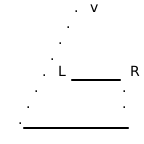
This diagram represents a single step in the bottom-up merging phase of the DME algorithm. Here’s what each part signifies:
L and R: These represent two subtrees that have already been constructed. They could be individual sinks (leaf nodes) or more complex subtrees that have been built in previous steps. In the context of the diagram, they are the “children” being merged.
The Boxes Around L and R: These boxes represent the merging segments (MS) of the left and right subtrees, respectively. A merging segment is a set of all possible locations where a new parent node can be placed to connect the children while satisfying the prescribed-skew (not necessarily zero) constraint.
v: This is the new parent node being created to merge the left and right subtrees. Its exact position is not yet determined; it will be chosen from the new merging segment.
The Dashed Lines: These lines show the projection of the child merging segments to form the new merging segment for the parent node v. The new merging segment is the set of all points that are equidistant (in terms of delay) from the child merging segments.
How it Relates to the DME Algorithm
The DME algorithm works in two main phases:
Bottom-Up Merging (Construction of Merging Segments): * The algorithm starts with the individual sinks (leaf nodes) of the clock tree. * It iteratively merges the two closest subtrees (initially, these are just sinks). * For each merge, it computes a new merging segment for the parent node. This is where the svgbob diagram comes in. The new merging segment is calculated based on the merging segments of the two children being merged. * This process continues until all subtrees have been merged into a single root node.
Top-Down Embedding (Placement of Internal Nodes): * Once the merging segments for all nodes have been computed, the algorithm works its way down from the root. * It chooses a specific physical location for each internal node from its pre-computed merging segment. * The choice of location is typically made to minimize wire length or other optimization objectives.
In the Context of the Code
_build_merging_tree: This function builds the initial tree structure by recursively partitioning the sinks.
_compute_merging_segments: This is the core of the bottom-up phase. It traverses the tree from the leaves to the root, and for each internal node, it computes its merging segment based on its children’s segments. This is where the logic represented by the svgbob diagram is implemented.
_embed_tree: This function performs the top-down embedding, selecting the final positions for the internal nodes.
- By adding this svgbob diagram, the documentation provides a quick visual reference that helps
users understand the fundamental concept of how merging segments are constructed in the DME algorithm, making the code easier to grasp.
Examples
>>> from physdes.point import Point
>>> from physdes.cts.dme_algorithm import Sink, DMEAlgorithm, LinearDelayCalculator
>>> sinks = [Sink("s1", Point(0, 0), 1.0), Sink("s2", Point(10, 0), 1.0)]
>>> calc = LinearDelayCalculator()
>>> dme = DMEAlgorithm(sinks, delay_calculator=calc, source=Point(5,0))
>>> tree = dme.build_clock_tree()
>>> analysis = dme.analyze_skew(tree)
>>> analysis['skew']
0.0
>>> analysis['total_wirelength']
10
>>> tree.position
Point(5, 0)
>>> tree.left.position
Point(0, 0)
>>> tree.right.position
Point(10, 0)
>>> round(tree.left.delay, 2)
5.0
>>> round(tree.right.delay, 2)
5.0
- MA_TYPE: Type[ManhattanArc] | Type[ManhattanArc3D]
- __init__(sinks, delay_calculator, source=None)[source]
Initialize DME algorithm with delay calculation strategy
- Parameters:
sinks (List[Sink]) – List of clock sinks with positions and capacitances
delay_calculator (DelayCalculator) – Strategy for delay calculation
Examples
>>> linear_calc = LinearDelayCalculator(delay_per_unit=0.5)
>>> sinks = [Sink("s1", Point(10, 20), 1.0)]
>>> dme = DMEAlgorithm(sinks, delay_calculator=linear_calc)
>>> isinstance(dme.delay_calculator, LinearDelayCalculator)
True
>>> elmore_calc = ElmoreDelayCalculator(unit_resistance=0.1, unit_capacitance=0.2)
>>> dme = DMEAlgorithm(sinks, delay_calculator=elmore_calc)
>>> isinstance(dme.delay_calculator, ElmoreDelayCalculator)
True
- class physdes.cts.dme_algorithm.DelayCalculator[source]
Bases:
ABCAbstract base class for delay calculation strategies
- abstractmethod calculate_tapping_point(node_left, node_right, distance)[source]
Calculate extra length based on skew
- abstractmethod calculate_wire_capacitance(length)[source]
Calculate wire capacitance for given length
- Return type:
- class physdes.cts.dme_algorithm.ElmoreDelayCalculator(unit_resistance=1.0, unit_capacitance=1.0)[source]
Bases:
DelayCalculatorElmore delay model for RC trees
- __init__(unit_resistance=1.0, unit_capacitance=1.0)[source]
Initialize Elmore delay calculator
- Parameters:
Examples
>>> calc = ElmoreDelayCalculator(unit_resistance=0.1, unit_capacitance=0.2)
>>> calc.unit_resistance
0.1
- calculate_tapping_point(node_left, node_right, distance)[source]
Calculate extra length based on skew
- calculate_wire_capacitance(length)[source]
Calculate wire capacitance
Examples
>>> calc = ElmoreDelayCalculator(unit_capacitance=0.2)
>>> calc.calculate_wire_capacitance(10)
2.0
- calculate_wire_delay(length, load_capacitance)[source]
Calculate Elmore delay for a wire segment
- Parameters:
- Returns:
Elmore delay
- Return type:
Examples
>>> calc = ElmoreDelayCalculator(unit_resistance=0.1, unit_capacitance=0.2)
>>> calc.calculate_wire_delay(10, 5.0)
6.0
- calculate_wire_delay_per_unit(load_capacitance)[source]
Calculate Elmore delay per unit length
- Parameters:
load_capacitance (float) – Load capacitance
- Returns:
Delay per unit length
- Return type:
Examples
>>> calc = ElmoreDelayCalculator(unit_resistance=0.1, unit_capacitance=0.2)
>>> calc.calculate_wire_delay_per_unit(5.0)
0.51
- class physdes.cts.dme_algorithm.LinearDelayCalculator(delay_per_unit=1.0, capacitance_per_unit=1.0)[source]
Bases:
DelayCalculatorLinear delay model: delay = k * length
- __init__(delay_per_unit=1.0, capacitance_per_unit=1.0)[source]
Initialize linear delay calculator
- Parameters:
Examples
>>> calc = LinearDelayCalculator(delay_per_unit=0.5, capacitance_per_unit=0.2)
>>> calc.delay_per_unit
0.5
- calculate_tapping_point(node_left, node_right, distance)[source]
Calculate extra length based on skew
- calculate_wire_capacitance(length)[source]
Calculate wire capacitance
Examples
>>> calc = LinearDelayCalculator(capacitance_per_unit=0.2)
>>> calc.calculate_wire_capacitance(10)
2.0
- calculate_wire_delay(length, load_capacitance)[source]
Calculate wire delay using linear model
- Parameters:
- Returns:
Wire delay
- Return type:
Examples
>>> calc = LinearDelayCalculator(delay_per_unit=0.5)
>>> calc.calculate_wire_delay(10, 5.0)
5.0
- calculate_wire_delay_per_unit(load_capacitance)[source]
Calculate delay per unit length
- Parameters:
load_capacitance (float) – Load capacitance (ignored in linear model)
- Returns:
Delay per unit length
- Return type:
Examples
>>> calc = LinearDelayCalculator(delay_per_unit=0.5)
>>> calc.calculate_wire_delay_per_unit(5.0)
0.5
- class physdes.cts.dme_algorithm.Sink(name, position, capacitance=1.0)[source]
Bases:
objectRepresents a clock sink with position and capacitance
Examples
>>> sink = Sink(name="s1", position=Point(10, 20), capacitance=1.5)
>>> sink.name
's1'
>>> sink.position
Point(10, 20)
>>> sink.capacitance
1.5
>>> sink = Sink(name="s1", position=Point(Point(10, 20), 20), capacitance=1.5)
>>> sink.name
's1'
>>> sink.position
Point(Point(10, 20), 20)
>>> sink.capacitance
1.5
- __init__(name, position, capacitance=1.0)
- class physdes.cts.dme_algorithm.TreeNode(name, position, left=None, right=None, parent=None, wire_length=0, delay=0.0, capacitance=0.0)[source]
Bases:
objectRepresents a node in the clock tree
Examples
>>> node = TreeNode(name="n1", position=Point(30, 40))
>>> node.name
'n1'
>>> node.position
Point(30, 40)
>>> node = TreeNode(name="n1", position=Point(Point(30, 40), 40))
>>> node.name
'n1'
>>> node.position
Point(Point(30, 40), 40)
- __init__(name, position, left=None, right=None, parent=None, wire_length=0, delay=0.0, capacitance=0.0)
- need_elongation = False
- physdes.cts.dme_algorithm.example_dme_usage()[source]
Example demonstrating how to use the DME algorithm with different delay models
- physdes.cts.dme_algorithm.get_tree_statistics(root)[source]
Extract comprehensive statistics from the clock tree
- Parameters:
root (TreeNode) – Root node of the clock tree
- Returns:
Dictionary with tree statistics
- Return type:
Examples
>>> from physdes.point import Point
>>> from physdes.cts.dme_algorithm import TreeNode, get_tree_statistics
>>> s1 = TreeNode(name="s1", position=Point(10, 20))
>>> s2 = TreeNode(name="s2", position=Point(30, 40))
>>> root = TreeNode(name="n1", position=Point(20, 30), left=s1, right=s2)
>>> stats = get_tree_statistics(root)
>>> stats["total_nodes"]
3
>>> stats["total_sinks"]
2