physdes package
Subpackages
- physdes.cts namespace
- physdes.router namespace
- Submodules
- physdes.router.global_router module
- physdes.router.routing_tree module
GlobalRoutingTreeGlobalRoutingTree.__init__()GlobalRoutingTree.calculate_total_wirelength()GlobalRoutingTree.calculate_worst_wirelength()GlobalRoutingTree.find_path_to_source()GlobalRoutingTree.get_all_steiner_nodes()GlobalRoutingTree.get_all_terminals()GlobalRoutingTree.get_tree_structure()GlobalRoutingTree.insert_node_on_branch()GlobalRoutingTree.insert_steiner_node()GlobalRoutingTree.insert_terminal_node()GlobalRoutingTree.insert_terminal_with_constraints()GlobalRoutingTree.insert_terminal_with_steiner()GlobalRoutingTree.optimize_steiner_points()GlobalRoutingTree.visualize_tree()GlobalRoutingTree.visualize_tree3d()
NodeTypeRoutingNode
- physdes.router.routing_visualizer module
- physdes.steiner_forest namespace
Submodules
physdes.generic module
Generic Operations for Physical Design (srcphysdesgeneric.py)
This code defines a set of generic operations that are commonly used in physical design calculations. These operations are designed to work with different types of objects, including simple numbers (scalars) and more complex objects like intervals.
The code contains four main functions: overlap, contain, intersection, and min_dist. Each of these functions takes two inputs, typically referred to as ‘lhs’ (left-hand side) and ‘rhs’ (right-hand side), and performs a specific operation on them.
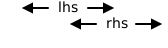
The ‘overlap’ function checks if two objects overlap or are equal. It returns True if they do overlap, and False otherwise. This function is useful for determining if two physical entities share some common space or value.
The ‘contain’ function checks if one object contains another. It returns True if the left-hand side object contains the right-hand side object, and False otherwise. This can be used to determine if one physical entity is completely within another.
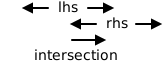
The ‘intersection’ function finds the common part between two objects. If the objects are numbers, it returns the number if they’re equal. For more complex objects, it returns the overlapping region. This is useful for finding where two physical entities meet or share space.
The ‘min_dist’ function calculates the minimum Manhattan distance between two objects. For numbers, it simply calculates the absolute difference. For more complex objects, it uses a special method to determine the closest points between the objects. This can be used to find how far apart two physical entities are.
Each of these functions is designed to work with both simple numbers and more complex objects. They do this by first checking if the input objects have special methods (like ‘overlaps’, ‘contains’, ‘intersect_with’, or ‘min_dist_with’). If these methods exist, the functions use them. If not, they fall back to simpler calculations assuming the inputs are just numbers.
The code also includes many examples (in the form of doctests) to show how each function works with different types of inputs. These examples help illustrate the behavior of the functions and can be used to automatically test that the functions are working correctly.
Overall, this code provides a flexible set of tools for performing common operations in physical design calculations, capable of working with both simple numbers and more complex geometric objects.
- physdes.generic.center(obj)[source]
The center function calculates the center of an object.
- Parameters:
obj (Any) – The obj parameter represents the object for which the center is to be calculated.
- Returns:
the center of the object.
- Return type:
Examples
>>> center(1)
1
>>> from physdes.interval import Interval
>>> center(Interval(1, 3))
2
- physdes.generic.contain(lhs, rhs)[source]
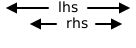
The contain function checks if one object contains another object.
- Parameters:
lhs (Any) – The lhs parameter represents the left-hand side of the comparison, while the rhs parameter represents the right-hand side of the comparison
rhs (Any) – The rhs parameter represents the right-hand side of the comparison. It can be any value or object that you want to check if it is contained within the lhs object
- Returns:
a boolean value.
- Return type:
Examples
>>> contain(1, 1)
True
>>> contain(1, 3)
False
>>> from physdes.interval import Interval
>>> contain(Interval(1, 4), Interval(2, 3))
True
>>> contain(Interval(1, 2), Interval(3, 4))
False
>>> contain(Interval(1, 2), 2)
True
>>> contain(Interval(1, 2), 4)
False
>>> contain(2, Interval(2, 3))
False
>>> contain(1, Interval(3, 4))
False
- physdes.generic.displacement(lhs, rhs)[source]
The displacement function calculates the displacement between two objects or scalars.
- Parameters:
- Returns:
the displacement between lhs and rhs. If lhs has a displace method, it calls that method passing rhs as an argument. Otherwise, it assumes lhs is a scalar and returns the difference between lhs and rhs.
- Return type:
Examples
>>> displacement(1, 1)
0
>>> displacement(1, 3)
-2
>>> from physdes.interval import Interval
>>> print(displacement(Interval(1, 2), Interval(2, 3)))
[-1, -1]
>>> print(displacement(Interval(1, 2), Interval(3, 4)))
[-2, -2]
>>> from physdes.point import Point
>>> print(displacement(Point(1, 2), Point(3, 4)))
<-2, -2>
- physdes.generic.intersection(lhs, rhs)[source]
The intersection function returns the intersection of two objects if they have an intersect_with method, otherwise it returns the objects themselves if they are equal.
- Parameters:
lhs (Any) – The lhs parameter represents the left-hand side of the intersection operation, while the rhs parameter represents the right-hand side of the intersection operation
rhs (Any) – The rhs parameter is the second input to the intersection function. It represents the right-hand side of the intersection operation
- Returns:
the intersection of lhs and rhs.
- Return type:
Examples
>>> print(intersection(1, 1))
1
>>> from physdes.interval import Interval
>>> print(intersection(Interval(1, 2), Interval(2, 3)))
[2, 2]
>>> print(intersection(Interval(1, 2), 2))
[2, 2]
>>> print(intersection(2, Interval(2, 3)))
[2, 2]
>>> print(intersection(1, Interval(1, 2)))
[1, 1]
>>> print(intersection(Interval(1, 2), Interval(1, 2)))
[1, 2]
>>> print(intersection(Interval(1, 2), Interval(2, 3)))
[2, 2]
>>> print(intersection(Interval(1, 2), 2))
[2, 2]
- physdes.generic.lower(obj)[source]
The lower function calculates the lower corner of an object.
- Parameters:
obj (Any) – The obj parameter represents the object for which the lower corner is to be calculated.
- Returns:
the lower corner of the object.
- Return type:
Examples
>>> lower(1)
1
>>> from physdes.interval import Interval
>>> lower(Interval(1, 3))
1
- physdes.generic.measure_of(obj)[source]
The measure_of function calculates the measure of an object.
- Parameters:
obj (Any) – The obj parameter represents the object for which the measure is to be calculated.
- Returns:
the measure of the object.
- Return type:
Examples
>>> measure_of(1)
1
>>> from physdes.interval import Interval
>>> measure_of(Interval(1, 2))
1
- physdes.generic.min_dist(lhs, rhs)[source]
The min_dist function calculates the minimum Manhattan distance between two objects, using their min_dist_with method if available, or by subtracting them if they are scalars.
- Parameters:
- Returns:
the minimum Manhattan distance between lhs and rhs.
- Return type:

Examples
>>> min_dist(1, 1)
0
>>> min_dist(1, 3)
2
>>> from physdes.interval import Interval
>>> min_dist(Interval(1, 2), Interval(2, 3))
0
>>> min_dist(Interval(1, 2), Interval(3, 4))
1
>>> min_dist(Interval(1, 2), 2)
0
>>> min_dist(Interval(1, 2), 4)
2
>>> min_dist(2, Interval(2, 3))
0
>>> min_dist(1, Interval(3, 4))
2
>>> min_dist(1, Interval(1, 2))
0
>>> min_dist(Interval(1, 2), Interval(1, 2))
0
>>> min_dist(Interval(1, 2), Interval(2, 3))
0
>>> min_dist(Interval(1, 2), 2)
0
>>> min_dist(2, Interval(2, 3))
0
- physdes.generic.nearest(lhs, rhs)[source]
The nearest function returns the nearest point on lhs to rhs.
- Parameters:
- Returns:
the nearest point on lhs to rhs.
- Return type:
Examples
>>> nearest(1, 1)
1
>>> nearest(1, 3)
1
>>> from physdes.interval import Interval
>>> nearest(Interval(1, 2), 4)
2
>>> nearest(Interval(1, 5), 4)
4
- physdes.generic.overlap(lhs, rhs)[source]
The overlap function checks if two objects have an overlapping property or are equal.
- Parameters:
- Returns:
a boolean value.
- Return type:
Examples
>>> overlap(1, 1)
True
>>> overlap(1, 3)
False
>>> from physdes.interval import Interval
>>> overlap(Interval(1, 2), Interval(2, 3))
True
>>> overlap(Interval(1, 2), Interval(3, 4))
False
>>> overlap(Interval(1, 2), 2)
True
>>> overlap(Interval(1, 2), 4)
False
>>> overlap(2, Interval(2, 3))
True
>>> overlap(1, Interval(3, 4))
False
>>> overlap(1, Interval(1, 2))
True
- physdes.generic.upper(obj)[source]
The upper function calculates the upper corner of an object.
- Parameters:
obj (Any) – The obj parameter represents the object for which the upper corner is to be calculated.
- Returns:
the upper corner of the object.
- Return type:
Examples
>>> upper(1)
1
>>> from physdes.interval import Interval
>>> upper(Interval(1, 3))
3
physdes.interval module
Interval Class
This code defines an Interval class, which represents a range of numbers with a lower bound and an upper bound. The purpose of this class is to provide a way to work with intervals of numbers, allowing various operations and comparisons to be performed on them.
The Interval class takes two inputs when creating an instance: a lower bound (lb) and an upper bound (ub). These can be either integers or floating-point numbers. The class then stores these values and provides methods to access and manipulate them.
The main outputs of this class are the results of various operations on intervals, such as checking if two intervals overlap, finding the intersection between intervals, or calculating the minimum distance between intervals.
The class achieves its purpose by implementing a variety of methods that perform calculations and comparisons on the lower and upper bounds of the intervals. For example, the overlaps method checks if two intervals have any numbers in common, while the contains method determines if a given number or interval is entirely within another interval.
Some important logic flows in this code include:
Comparison operations: The class implements methods like __lt__, __gt__, __le__, and __ge__ to compare intervals with other intervals or single numbers.
Arithmetic operations: Methods like __add__, __sub__, and __mul__ allow intervals to be added, subtracted, or multiplied by scalar values.
Set-like operations: The hull_with method finds the smallest interval that contains both the current interval and another interval or number, while intersect_with finds the overlap between two intervals.
The code also includes utility functions outside the class, such as hull and enlarge, which can work with both Interval objects and scalar values. These functions provide a more flexible way to perform operations on intervals and numbers.
Overall, this Interval class provides a comprehensive set of tools for working with ranges of numbers, which can be useful in various applications such as scheduling, resource allocation, or numerical analysis. It allows programmers to easily manipulate and compare intervals without having to manually handle the lower and upper bounds separately.
- class physdes.interval.Interval(lb, ub)[source]
Bases:
Generic[T]- __add__(rhs)[source]
The function overloads the “+” operator to add a constant value to the lower and upper bounds of an Interval object.
- Parameters:
rhs (T) – The parameter rhs stands for “right-hand side” and represents the value that is being added to the current object
- Returns:
The method is returning a new instance of the class S (which is the same type as self) with the lower bound (lb) and upper bound (ub) incremented by rhs.
- Return type:
Interval[T]
Examples
>>> a = Interval(3, 4)
>>> print(a + 10)
[13, 14]
- classmethod __class_getitem__(params)
Parameterizes a generic class.
At least, parameterizing a generic class is the main thing this method does. For example, for some generic class Foo, this is called when we do Foo[int] - there, with cls=Foo and params=int.
However, note that this method is also called when defining generic classes in the first place with class Foo(Generic[T]): ….
- __eq__(other)[source]
Check equality between this interval and another object.
- Parameters:
other (object) – The object to compare with.
- Returns:
True if the intervals have the same lower and upper bounds, False otherwise.
- Return type:
Examples
>>> a = Interval(3, 5)
>>> b = Interval(3, 5)
>>> a == b
True
>>> c = Interval(3, 6)
>>> a == c
False
>>> a == 3
False
- __floordiv__(rhs)[source]
The function overloads the “//” operator to floor divide a constant value to the lower and upper bounds of an Interval object.
- Parameters:
rhs (T) – The parameter rhs stands for “right-hand side” and represents the value that is being divided to the current object
- Returns:
The method is returning a new instance of the class S (which is the same type as self) with the lower bound (lb) and upper bound (ub) incremented by rhs.
- Return type:
Interval[T]
- __ge__(other)[source]
Checks if this interval is not strictly to the left of another value.
This method returns True if this interval is not strictly less than the given value or interval.
- Parameters:
other (Union[Interval[T], T]) – The value or interval to compare with.
- Returns:
True if this interval is greater than or equal to other.
- Return type:
Examples
>>> a = Interval(5, 7)
>>> b = Interval(3, 5)
>>> a >= b
True
>>> a >= 5
True
>>> b >= a
True
>>> a >= 7
True
- __gt__(other)[source]
Checks if this interval is strictly to the right of another value.
This method returns True if the lower bound of this interval is greater than the given value (or the upper bound of the given interval).
- Parameters:
other (Union[Interval[T], T]) – The value or interval to compare with.
- Returns:
True if this interval is strictly to the right of other.
- Return type:
Examples
>>> a = Interval(5, 6)
>>> b = Interval(3, 4)
>>> a > b
True
>>> a > 4
True
>>> b > a
False
>>> a > 5
False
- __iadd__(rhs)[source]
The __iadd__ method allows for in-place addition of an Interval object.
- Parameters:
rhs (T) – The parameter rhs represents the right-hand side value that is being added to the current object. In this case, it is expected to be of type T, which is a generic type
- Returns:
The method __iadd__ returns self, which is an instance of the class “Interval[T]”.
- Return type:
Interval[T]
Examples
>>> a = Interval(3, 4)
>>> a += 10
>>> print(a)
[13, 14]
- __imul__(rhs)[source]
The __imul__ method allows for in-place multiplication of an Interval object.
- Parameters:
rhs (T) – The parameter rhs represents the right-hand side value that is being multiplied to the current object. In this case, it is expected to be of type T, which is a generic type
- Returns:
The method __imul__ returns self, which is an instance of the class “Interval[T]”.
- Return type:
Interval[T]
Examples
>>> a = Interval(3, 4)
>>> a *= 10
>>> print(a)
[30, 40]
- __init__(lb, ub)[source]
The function initializes an Interval object with lower bound lb and upper bound ub.
- Parameters:
lb (T) – The lb parameter represents the lower bound of the interval. It is of type T, which means it can be any data type
ub (T) – The ub parameter represents the upper bound of the interval. It is the maximum value that the interval can take
Examples
>>> a = Interval(3, 4)
>>> print(a)
[3, 4]
>>> print(a.lb)
3
>>> print(a.ub)
4
- __isub__(rhs)[source]
The function subtracts a value from both the lower and upper bounds of an Interval object and returns the modified object.
- Parameters:
rhs (T) – The parameter rhs represents the right-hand side value that will be subtracted from the current object. In this case, it is expected to be of type T, which is a generic type
- Returns:
The method is returning self, which is an instance of the class that the method belongs to.
- Return type:
Interval[T]
Examples
>>> a = Interval(3, 4)
>>> a -= 1
>>> print(a)
[2, 3]
- __le__(other)[source]
Checks if this interval is not strictly to the right of another value.
This method returns True if this interval is not strictly greater than the given value or interval.
- Parameters:
other (Union[Interval[T], T]) – The value or interval to compare with.
- Returns:
True if this interval is less than or equal to other.
- Return type:
Examples
>>> a = Interval(3, 5)
>>> b = Interval(5, 7)
>>> a <= b
True
>>> a <= 5
True
>>> b <= a
True
>>> a <= 3
True
- __lt__(other)[source]
Checks if this interval is strictly to the left of another value.
This method returns True if the upper bound of this interval is less than the given value (or the lower bound of the given interval).
- Parameters:
other (Union[Interval[T], T]) – The value or interval to compare with.
- Returns:
True if this interval is strictly to the left of other.
- Return type:
Examples
>>> a = Interval(3, 4)
>>> b = Interval(5, 6)
>>> a < b
True
>>> a < 5
True
>>> b < a
False
>>> a < 4
False
- __mul__(rhs)[source]
The function overloads the “*” operator to multiply a constant value to the lower and upper bounds of an Interval object.
- Parameters:
rhs (T) – The parameter rhs stands for “right-hand side” and represents the value that is being multiplied to the current object
- Returns:
The method is returning a new instance of the class S (which is the same type as self) with the lower bound (lb) and upper bound (ub) incremented by rhs.
- Return type:
Interval[T]
Examples
>>> a = Interval(3, 4)
>>> print(a * 10)
[30, 40]
- __neg__()[source]
The __neg__ function returns a new instance of the class with the lower and upper bounds negated.
- Returns:
The __neg__ method returns a new instance of the same class (S) with the lower bound (lb) and upper bound (ub) negated.
- Return type:
Interval[T]
Examples
>>> a = Interval(3, 4)
>>> print(-a)
[-4, -3]
- __radd__(lhs)[source]
The __radd__ function allows for in-place addition of an Interval object.
- Parameters:
lhs (T) – The parameter lhs represents the left-hand side value that is being added to the current object. In this case, it is expected to be of type T, which is a generic type
- Returns:
The method __radd__ returns self, which is an instance of the class “Interval[T]”.
- Return type:
Interval[T]
- __repr__()[source]
The __repr__ function returns a string representation of an Interval object, including the class name and its lower and upper bounds, which is useful for debugging.
- Returns:
The __repr__ method is returning a string representation of the Interval object.
- Return type:
Examples
>>> a = Interval(3, 4)
>>> repr(a)
'Interval(3, 4)'
- __rsub__(lhs)[source]
The __rsub__ function allows for in-place subtraction of an Interval object.
- Parameters:
lhs (T) – The parameter lhs represents the left-hand side value that is being subtracted from the current object. In this case, it is expected to be of type T, which is a generic type
- Returns:
The method __rsub__ returns self, which is an instance of the class “Interval[T]”.
- Return type:
Interval[T]
- __str__()[source]
The __str__ function returns a string representation of an Interval object in the format “[lb, ub]”.
- Returns:
The method __str__ returns a string representation of the object. In this case, it returns a string in the format “[lb, ub]”, where lb is the lower bound and ub is the upper bound of the interval.
- Return type:
Examples
>>> a = Interval(3, 4)
>>> print(a)
[3, 4]
- __sub__(rhs)[source]
The function subtracts a value from the lower and upper bounds of an interval and returns a new interval.
- Parameters:
rhs (T) – The parameter rhs stands for “right-hand side” and represents the value that is being subtracted from the interval
- Returns:
The method is returning a new instance of the class S (which is the same type as self) with the lower bound (lb) and upper bound (ub) subtracted by rhs.
- Return type:
Interval[T]
Examples
>>> a = Interval(3, 4)
>>> print(a - 1)
[2, 3]
- __truediv__(rhs)[source]
The function overloads the “/” operator to divide a constant value to the lower and upper bounds of an Interval object.
- Parameters:
rhs (T) – The parameter rhs stands for “right-hand side” and represents the value that is being divided to the current object
- Returns:
The method is returning a new instance of the class S (which is the same type as self) with the lower bound (lb) and upper bound (ub) incremented by rhs.
- Return type:
Interval[T]
- contains(obj)[source]
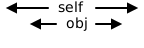
The contains function checks if an object is contained within a given interval.
- Parameters:
obj (Union["Interval[T]", T]) – The obj parameter can be either an instance of the Interval class or an integer
- Returns:
The contains method returns a boolean value indicating whether the given object is contained within the interval.
- Return type:
Examples
>>> a = Interval(3, 8)
>>> a.contains(4)
True
>>> a.contains(Interval(4, 7))
True
>>> a.contains(Interval(6, 9))
False
>>> a.contains(3)
True
>>> a.contains(8)
True
- displace(obj)[source]
The displace function takes an object as an argument and returns a new Interval object with the lower and upper bounds displaced by the corresponding bounds of the input object.
- Parameters:
obj ("Interval[T]") – The obj parameter is an object of the same class as the self object. It represents another interval that will be used to displace the current interval
- Returns:
The displace method returns an Interval object.
- Return type:
Interval[T]
Examples
>>> a = Interval(3, 5)
>>> print(a.displace(Interval(4, 7)))
[-1, -2]
>>> print(a.displace(Interval(6, 9)))
[-3, -4]
- enlarge_with(alpha)[source]
The enlarge_with function takes a value alpha and returns a new instance of the same type with the lower bound decreased by alpha and the upper bound increased by alpha.
- Parameters:
alpha (T) – The parameter “alpha” represents the amount by which the interval should be enlarged
- Returns:
The method enlarge_with returns a new instance of the same class (“Interval[T]”) with the lower bound decreased by alpha and the upper bound increased by alpha.
- Return type:
Interval[T]
Examples
>>> a = Interval(3, 5)
>>> print(a.enlarge_with(2))
[1, 7]
- get_center()[source]
Calculates the center of the point.
- Returns:
The center of the point.
- Return type:
T
Examples
>>> a = Interval(3, 7)
>>> a.get_center()
5
- hull_with(obj)[source]
The hull_with function takes an object (either an Interval or a scalar) and returns a new Interval object that represents the hull (smallest interval that contains both intervals) of the current Interval object and the input object.
- Parameters:
obj (Union["Interval[T]", T]) – The obj parameter can be either an instance of the same class (“Interval[T]”) or a scalar value (T)
- Returns:
The method hull_with returns an Interval object.
- Return type:
Interval[T]
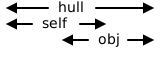
Examples
>>> a = Interval(3, 8)
>>> print(a.hull_with(Interval(4, 7)))
[3, 8]
>>> print(a.hull_with(Interval(6, 9)))
[3, 9]
>>> print(a.hull_with(Interval(0, 2)))
[0, 8]
- intersect_with(obj)[source]
The intersect_with function takes in an object and returns the intersection between the object and the current interval.
- Parameters:
obj (Union["Interval[T]", T]) – The obj parameter can be either an instance of the “Interval[T]” class (which is the same class as self), or it can be of type T, which is a generic type
- Returns:
The intersect_with method returns an Interval object that represents the intersection between the current Interval object (self) and the input object (obj).
- Return type:
Interval[T]
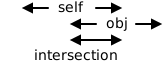
Examples
>>> a = Interval(3, 8)
>>> print(a.intersect_with(4))
[4, 4]
>>> print(a.intersect_with(Interval(4, 7)))
[4, 7]
>>> print(a.intersect_with(Interval(6, 9)))
[6, 8]
>>> print(a.intersect_with(Interval(3, 5)))
[3, 5]
>>> print(a.intersect_with(Interval(5, 7)))
[5, 7]
>>> print(a.intersect_with(Interval(3, 6)))
[3, 6]
>>> print(a.intersect_with(Interval(5, 8)))
[5, 8]
>>> print(a.intersect_with(Interval(3, 7)))
[3, 7]
>>> print(a.intersect_with(Interval(0, 2)))
[3, 2]
- is_invalid()[source]
Check if the interval is invalid (lower bound is greater than upper bound).
- Returns:
True if the interval is invalid, False otherwise.
- Return type:
Examples
>>> a = Interval(3, 4)
>>> a.is_invalid()
False
>>> b = Interval(4, 3)
>>> b.is_invalid()
True
- property lb: T
The function lb returns the lower bound of an interval.
- Returns:
The method is returning the lower bound of the interval.
Examples
>>> a = Interval(3, 4)
>>> a.lb
3
- lower_corner()[source]
Calculates the lower corner of the point.
- Returns:
The lower corner of the point.
- Return type:
T
Examples
>>> a = Interval(3, 7)
>>> a.lower_corner()
3
- measure()[source]
Calculates the measure (length) of the interval.
The measure (length) is the difference between the upper and lower bounds.
- Returns:
The measure (length) of the interval.
- Return type:
T
Examples
>>> a = Interval(3, 4)
>>> a.measure()
1
>>> b = Interval(3, 8)
>>> b.measure()
5
- min_dist_with(obj)[source]
The function calculates the minimum distance between two objects.
- Parameters:
obj (Union["Interval[T]", T]) – The parameter obj can be of type “Interval[T]” or T
- Returns:
The function min_dist_with returns the minimum distance between the given object obj and the current object self.
- Return type:
T | int

Examples
>>> a = Interval(3, 5)
>>> print(a.min_dist_with(2))
1
>>> print(a.min_dist_with(Interval(4, 7)))
0
>>> print(a.min_dist_with(Interval(6, 9)))
1
>>> print(a.min_dist_with(Interval(3, 5)))
0
>>> print(a.min_dist_with(Interval(5, 7)))
0
>>> print(a.min_dist_with(Interval(0, 2)))
1
- nearest_to(obj)[source]
Return the nearest position with respect to obj
Examples
>>> a = Interval(3, 5)
>>> print(a.nearest_to(8))
5
>>> print(a.nearest_to(0))
3
>>> print(a.nearest_to(4))
4
- Return type:
T
- overlaps(other)[source]
The overlaps function checks if two intervals overlap with each other.
- Parameters:
other (Union["Interval[T]", T]) – The parameter “other” is of type Union[“Interval[T]”, T], which means it can accept either an object of the same class as “self” or an object of type “T”
- Returns:
a boolean value, either True or False.
- Return type:
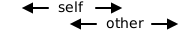
Examples
>>> a = Interval(3, 5)
>>> a.overlaps(Interval(4, 9))
True
>>> a.overlaps(Interval(6, 9))
False
>>> Interval(1, 5).overlaps(Interval(5, 7))
True
>>> Interval(1, 5).overlaps(Interval(0, 1))
True
- property ub: T
The function ub returns the upper bound of an interval.
- Returns:
The method is returning the upper bound of the interval.
Examples
>>> a = Interval(3, 4)
>>> a.ub
4
- physdes.interval.enlarge(lhs, rhs)[source]
Enlarges an interval or scalar by a given amount.
If lhs is an Interval, it is enlarged by rhs. If lhs is a scalar, it is treated as a zero-width interval and enlarged by rhs.
- Parameters:
lhs (Any) – The interval or scalar to enlarge.
rhs (T) – The amount to enlarge by.
- Returns:
The enlarged Interval.
- Return type:
Interval[T]
Examples
>>> a = Interval(3, 5)
>>> print(enlarge(a, 2))
[1, 7]
>>> print(enlarge(a, -1))
[4, 4]
>>> print(enlarge(5, 2))
[3, 7]
- physdes.interval.hull(lhs, rhs)[source]
Calculates the convex hull of two objects, returning the smallest interval that contains both.
This function can take two intervals, two scalars, or an interval and a scalar.
- Parameters:
- Returns:
The smallest Interval that contains both lhs and rhs.
- Return type:
Interval[T]
Examples
>>> a = Interval(3, 5)
>>> print(hull(a, 4))
[3, 5]
>>> print(hull(a, Interval(4, 7)))
[3, 7]
>>> print(hull(a, Interval(6, 9)))
[3, 9]
>>> print(hull(a, Interval(0, 2)))
[0, 5]
>>> print(hull(2, 5))
[2, 5]
physdes.manhattan_arc module
ManhattanArc Class
This code defines a class called ManhattanArc, which represents a geometric object in a 2D space. The purpose of this class is to handle operations on points, segments, or regions that are rotated 45 degrees. It’s designed to work with different types of coordinates, such as integers, floats, or intervals.
The ManhattanArc class takes two inputs when creating an object: xcoord and ycoord. These represent the coordinates of the object in the rotated space. The class doesn’t produce a specific output on its own, but it provides various methods to manipulate and interact with these objects.
The class achieves its purpose by storing the coordinates in a Point object and providing methods to perform operations like translation, enlargement, intersection, and merging with other ManhattanArc instances. It uses a 45-degree rotated coordinate system, which allows for easier calculations in certain geometric operations.
Some important logic flows in this code include:
The constructor (init) creates a Point object with the given coordinates.
The construct method creates a ManhattanArc from regular x and y coordinates by rotating them 45 degrees.
The translation methods (iadd and isub) move the object by adding or subtracting vector components.
The min_dist_with method calculates the minimum rectilinear distance between two ManhattanArc instances.
The enlarge_with method creates a new ManhattanArc with enlarged coordinates.
The intersect_with method finds the intersection point between two ManhattanArc instances.
The merge_with method combines two ManhattanArc instances by enlarging them based on their distance and finding their intersection.
These operations allow for complex geometric manipulations, which can be useful in various applications such as computer graphics, game development, or computational geometry. The class provides a high-level interface for working with these rotated geometric objects, abstracting away some of the more complex mathematical calculations.
- class physdes.manhattan_arc.ManhattanArc(xcoord, ycoord)[source]
Bases:
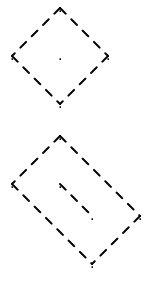
Generic[T1,T2]Merging point, segment, or region ⛝
A 45 degree rotated point, vertical or horizontal segment, or rectangle
- classmethod __class_getitem__(params)
Parameterizes a generic class.
At least, parameterizing a generic class is the main thing this method does. For example, for some generic class Foo, this is called when we do Foo[int] - there, with cls=Foo and params=int.
However, note that this method is also called when defining generic classes in the first place with class Foo(Generic[T]): ….
- __eq__(other)[source]
The __eq__ function checks if two ManhattanArc instances have the same impl attribute.
- Parameters:
other (object) – The other parameter represents the object that we are comparing with the current object
- Returns:
The __eq__ method is returning a boolean value.
- Return type:
Examples
>>> a = ManhattanArc(4 - 5, 4 + 5)
>>> b = ManhattanArc(7 - 9, 7 + 9)
>>> a == b
False
>>> c = ManhattanArc(-1, 9)
>>> a == c
True
- __init__(xcoord, ycoord)[source]
Initializes a ManhattanArc object with the given x and y coordinates.
- Parameters:
xcoord (T1) – The x-coordinate in the 45-degree rotated space.
ycoord (T2) – The y-coordinate in the 45-degree rotated space.
Examples
>>> a = ManhattanArc(4 - 5, 4 + 5)
>>> print(a)
/-1, 9/
- __repr__()[source]
The __repr__ function returns a string representation of an ManhattanArc object, including the class name and its x and y coordinates, which is useful for debugging.
- Returns:
The __repr__ method is returning a string representation of the ManhattanArc object.
- Return type:
Examples
>>> a = ManhattanArc(4 - 5, 4 + 5)
>>> repr(a)
'ManhattanArc(-1, 9)'
- __str__()[source]
The __str__ function returns a string representation of an object, specifically in the format “/xcoord, ycoord/”.
- Returns:
The method __str__ returns a string representation of the object. In this case, it returns a string in the format “/xcoord, ycoord/” where xcoord and ycoord are the x and y coordinates of the object.
- Return type:
Examples
>>> a = ManhattanArc(4 - 5, 4 + 5)
>>> print(a)
/-1, 9/
- static construct(xcoord, ycoord)[source]
Constructs a ManhattanArc object from standard x and y coordinates.
- Parameters:
- Returns:
A new ManhattanArc object.
- Return type:
ManhattanArc[int, int] | ManhattanArc[float, float]
- enlarge_with(alpha)[source]
The enlarge_with function takes an integer alpha and returns a new ManhattanArc object with enlarged coordinates.
- Parameters:
alpha (int) – The parameter alpha is an integer that represents the factor by which the coordinates of the ManhattanArc object should be enlarged
- Returns:
The enlarge_with method is returning a new ManhattanArc object with the enlarged coordinates.
- Return type:
Examples
>>> a = ManhattanArc(4 - 5, 4 + 5)
>>> r = a.enlarge_with(1)
>>> print(r)
/[-2, 0], [8, 10]/
- classmethod from_point(pt)[source]
Create a ManhattanArc object from a 2D point.
- Parameters:
pt (Point) – A 2D point.
- Returns:
A new ManhattanArc object.
- Return type:
- get_center()[source]
Calculates the center of the merging segment
Examples
>>> a = ManhattanArc(400 - 500, 400 + 500)
>>> b = ManhattanArc(700 - 900, 700 + 900)
>>> ms = a.merge_with(b, 350)
>>> print(ms.get_center())
(550, 700)
- get_lower_corner()[source]
Calculates the lower corner of the merging segment
Examples
>>> a = ManhattanArc(400 - 500, 400 + 500)
>>> b = ManhattanArc(700 - 900, 700 + 900)
>>> ms = a.merge_with(b, 350)
>>> print(ms.get_lower_corner())
(400, 850)
- get_upper_corner()[source]
Calculates the upper corner of the merging segment
Examples
>>> a = ManhattanArc(400 - 500, 400 + 500)
>>> b = ManhattanArc(700 - 900, 700 + 900)
>>> ms = a.merge_with(b, 350)
>>> print(ms.get_upper_corner())
(700, 550)
- intersect_with(other)[source]
The function calculates the intersection point between two ManhattanArc objects and returns a new ManhattanArc object with the coordinates of the intersection point.
- Parameters:
other (ManhattanArc[T1, T2]) – The “other” parameter is an object of the same class as the current object. It represents another instance of the ManhattanArc class that we want to find the intersection with
- Returns:
a ManhattanArc object with the x-coordinate and y-coordinate of the intersection point between the self object and the other object.
- Return type:
ManhattanArc[T1, T2]
Examples
>>> a = ManhattanArc(4 - 5, 4 + 5)
>>> r = a.intersect_with(a)
>>> print(r)
/-1, 9/
- merge_with(other, alpha)[source]
The merge_with function takes another object as input, calculates the minimum Manhattan distance between the two objects, enlarges the objects based on the calculated distance, finds the intersection of the enlarged objects, and returns a new object with the coordinates of the intersection.
- Parameters:
other (ManhattanArc[T1, T2]) – The “other” parameter is an object of the same class as the current object. It represents another instance of the class that we want to merge with the current instance
- Returns:
The merge_with method returns a new ManhattanArc object with the x-coordinate and y-coordinate of the intersection of the two objects being merged.
- Return type:
ManhattanArc[T1, T2]
Examples
>>> a = ManhattanArc(400 - 500, 400 + 500)
>>> b = ManhattanArc(700 - 900, 700 + 900)
>>> print(a.merge_with(b, 350))
/[-450, 150], [1250, 1250]/
- min_dist_with(other)[source]
The min_dist_with function calculates the minimum rectilinear distance between two objects.
- Parameters:
other (ManhattanArc[Any, Any]) – The other parameter represents another object with which you want to calculate the minimum rectilinear distance
- Returns:
the minimum rectilinear distance between the two objects.
- Return type:
Examples
>>> r1 = ManhattanArc(40 - 50, 40 + 50)
>>> r2 = ManhattanArc(70 - 90, 70 + 90)
>>> r1.min_dist_with(r2)
70
- nearest_point_to(other)[source]
Return the nearest position with respect to the given Point.
- Parameters:
other (Point[int, int]) – The other parameter is a Point object that represents the point to which we want to find the nearest position on the ManhattanArc.
- Returns:
The _nearest_point_to method returns a Point object that represents the nearest position with respect to the given manhattan_arc parameter.
- Return type:
Examples
>>> a = ManhattanArc(400 - 500, 400 + 500)
>>> b = ManhattanArc(700 - 900, 700 + 900)
>>> ms = a.merge_with(b, 350)
>>> print(ms.nearest_point_to(Point(0, 1000)))
(400, 850)
physdes.manhattan_arc_3d module
ManhattanArc3D Class (Not working)
This code defines a class called ManhattanArc3D, which represents a geometric object in a 3D space. The purpose of this class is to handle operations on points, segments, or regions that are rotated 45 degrees. It’s designed to work with different types of coordinates, such as integers, floats, or intervals.
The ManhattanArc3D class takes four inputs when creating an object: xcoord, ycoord, zcoord, and wcoord. These represent the coordinates of the object in the rotated space. The class doesn’t produce a specific output on its own, but it provides various methods to manipulate and interact with these objects.
The class achieves its purpose by storing the coordinates in a Point object and providing methods to perform operations like translation, enlargement, intersection, and merging with other ManhattanArc3D instances. It uses a 45-degree rotated coordinate system, which allows for easier calculations in certain geometric operations.
- class physdes.manhattan_arc_3d.ManhattanArc3D(w, x, y, z)[source]
Bases:
objectMerging point, segment, or region ⛝
- __eq__(other)[source]
The __eq__ function checks if two ManhattanArc3D instances have the same impl attribute.
- Parameters:
other (object) – The other parameter represents the object that we are comparing with the current object
- Returns:
The __eq__ method is returning a boolean value.
- Return type:
Examples
>>> a = ManhattanArc3D(4 + 5 + 3, 4 - 5 - 3, 4 - 5 + 3, 4 + 5 - 3)
>>> b = ManhattanArc3D(7 + 9 + 2, 7 - 9 - 2, 7 - 9 + 2, 7 + 9 - 2)
>>> a == b
False
>>> c = ManhattanArc3D.construct(8, 10, 6)
>>> a == c
True
- __init__(w, x, y, z)[source]
Initialize a ManhattanArc3D object with 4-interval coordinates.
- Parameters:
w – The w-interval coordinate in the 4-interval space.
x – The x-interval coordinate in the 4-interval space.
y – The y-interval coordinate in the 4-interval space.
z – The z-interval coordinate in the 4-interval space.
Examples
>>> a = ManhattanArc3D(4 + 5 + 3, 4 - 5 - 3, 4 - 5 + 3, 4 + 5 - 3)
>>> print(a)
/12, -4, 2, 6/
- __repr__()[source]
The __repr__ function returns a string representation of an ManhattanArc3D object, including the class name and its x and y coordinates, which is useful for debugging.
- Returns:
The __repr__ method is returning a string representation of the ManhattanArc3D object.
- Return type:
Examples
>>> a = ManhattanArc3D(4 + 5 + 3, 4 - 5 - 3, 4 - 5 + 3, 4 + 5 - 3)
>>> repr(a)
'ManhattanArc3D(12, -4, 2, 6)'
- __str__()[source]
The __str__ function returns a string representation of an object, specifically in the format “/xcoord, ycoord/”.
- Returns:
The method __str__ returns a string representation of the object. In this case, it returns a string in the format “/xcoord, ycoord/” where xcoord and ycoord are the x and y coordinates of the object.
- Return type:
Examples
>>> a = ManhattanArc3D(4 + 5 + 3, 4 - 5 - 3, 4 - 5 + 3, 4 + 5 - 3)
>>> print(a)
/12, -4, 2, 6/
- static construct(xcoord, ycoord, zcoord)[source]
Constructs a ManhattanArc3D object from standard x and y coordinates.
- Parameters:
xcoord – The x-coordinate.
ycoord – The y-coordinate.
zcoord – The z-coordinate.
- Returns:
A new ManhattanArc3D object.
- Return type:
Examples
>>> a = ManhattanArc3D.construct(8, 10, 6)
>>> print(a)
/12, -4, 2, 6/
- enlarge_with(alpha)[source]
Enlarge the ManhattanArc3D intervals by a given factor.
Expands each coordinate interval by the specified alpha value using the enlarge function from the interval module.
- Parameters:
alpha (int) – The expansion factor to enlarge each coordinate interval.
- Returns:
A new ManhattanArc3D object with enlarged coordinates.
- Return type:
Examples
>>> a = ManhattanArc3D(4 + 5 + 3, 4 - 5 - 3, 4 - 5 + 3, 4 + 5 - 3)
>>> r = a.enlarge_with(1)
>>> print(r)
/[11, 13], [-5, -3], [1, 3], [5, 7]/
- classmethod from_point(pt)[source]
Create a ManhattanArc3D object from a 3D point.
- Parameters:
pt (Point) – A 3D point.
- Returns:
A new ManhattanArc3D object.
- Return type:
- get_center()[source]
Calculates the center of the merging segment
- Returns:
The center of the merging segment.
Examples
>>> r1 = ManhattanArc3D(40 + 50 + 30, 40 - 50 - 30, 40 - 50 + 30, 40 + 50 - 30)
>>> r2 = ManhattanArc3D(70 + 90 + 20, 70 - 90 - 20, 70 - 90 + 20, 70 + 90 - 20)
>>> r3 = r1.merge_with(r2, 40)
>>> print(r3.get_center())
((110, 50), 140)
- get_lower_corner()[source]
Calculates the lower corner of the merging segment
- Returns:
The lower corner of the merging segment.
Examples
>>> r1 = ManhattanArc3D(40 + 50 + 30, 40 - 50 - 30, 40 - 50 + 30, 40 + 50 - 30)
>>> r2 = ManhattanArc3D(70 + 90 + 20, 70 - 90 - 20, 70 - 90 + 20, 70 + 90 - 20)
>>> r3 = r1.merge_with(r2, 40)
>>> print(r3.get_lower_corner())
((70, 50), 170)
- get_upper_corner()[source]
Calculates the upper corner of the merging segment
- Returns:
The upper corner of the merging segment.
Examples
>>> r1 = ManhattanArc3D(40 + 50 + 30, 40 - 50 - 30, 40 - 50 + 30, 40 + 50 - 30)
>>> r2 = ManhattanArc3D(70 + 90 + 20, 70 - 90 - 20, 70 - 90 + 20, 70 + 90 - 20)
>>> r3 = r1.merge_with(r2, 40)
>>> print(r3.get_upper_corner())
((150, 50), 110)
- intersect_with(other)[source]
Calculate the intersection between two ManhattanArc3D objects.
Computes the coordinate-wise intersection of the intervals stored in both ManhattanArc3D objects, returning a new ManhattanArc3D with the intersected coordinates.
- Parameters:
other (ManhattanArc3D) – Another ManhattanArc3D object to intersect with.
- Returns:
A new ManhattanArc3D object containing the intersection coordinates.
- Return type:
- merge_with(other, alpha)[source]
The merge_with function takes another object as input, calculates the minimum Manhattan distance between the two objects, enlarges the objects based on the calculated distance, finds the intersection of the enlarged objects, and returns a new object with the coordinates of the intersection.
- Parameters:
other – The “other” parameter is an object of the same class as the current object. It represents another instance of the class that we want to merge with the current instance
- Returns:
The merge_with method returns a new ManhattanArc3D object with the x-coordinate and y-coordinate of the intersection of the two objects being merged.
Examples
>>> r1 = ManhattanArc3D(4 + 5 + 3, 4 - 5 - 3, 4 - 5 + 3, 4 + 5 - 3)
>>> r2 = ManhattanArc3D(7 + 9 + 2, 7 - 9 - 2, 7 - 9 + 2, 7 + 9 - 2)
>>> r1.merge_with(r2, 4)
ManhattanArc3D([14, 16], [-8, 0], [-2, 4], [10, 10])
- min_dist_with(other)[source]
The min_dist_with function calculates the minimum rectilinear distance between two objects.
- Parameters:
other – The other parameter represents another object with which you want to calculate the minimum rectilinear distance
- Returns:
the minimum rectilinear distance between the two objects.
- Return type:
Examples
>>> r1 = ManhattanArc3D(4 + 5 + 3, 4 - 5 - 3, 4 - 5 + 3, 4 + 5 - 3)
>>> r2 = ManhattanArc3D(7 + 9 + 2, 7 - 9 - 2, 7 - 9 + 2, 7 + 9 - 2)
>>> r1.min_dist_with(r2)
8
- nearest_point_to(other)[source]
Calculates the nearest point on the merging segment to another ManhattanArc3D object.
- Parameters:
manhattan_arc – Another ManhattanArc3D object to which we want to find the nearest point on the merging segment.
- Returns:
The nearest point on the merging segment to the given ManhattanArc3D object.
Examples
>>> r1 = ManhattanArc3D(40 + 50 + 30, 40 - 50 - 30, 40 - 50 + 30, 40 + 50 - 30)
>>> r2 = ManhattanArc3D(70 + 90 + 20, 70 - 90 - 20, 70 - 90 + 20, 70 + 90 - 20)
>>> r3 = r1.merge_with(r2, 40)
>>> print(r3.nearest_point_to(Point(Point(1000, 1000), 1000)))
((110, 90), 150)
physdes.point module
Point Class
This code defines a Point class, which represents a point in a 2D coordinate system. The purpose of this class is to provide a way to work with points, perform operations on them, and compare them with other points or geometric shapes.
The Point class takes two inputs when creating a new point: xcoord and ycoord. These represent the x and y coordinates of the point, respectively. The class is designed to be flexible, allowing these coordinates to be integers, floats, intervals, or even other Point objects (for higher-dimensional points).
The class doesn’t produce a specific output on its own, but it provides many methods that can be used to manipulate points or get information about them. For example, you can add or subtract vectors from points, check if points overlap or contain each other, find the distance between points, and more.
The Point class achieves its purpose by storing the x and y coordinates and providing a set of methods to work with these coordinates. It uses operator overloading to make it easy to perform arithmetic operations with points, such as addition and subtraction. It also includes comparison methods to determine the relative positions of points.
Some important operations in the class include:
Adding and subtracting vectors from points
Checking if points overlap or contain each other
Finding the minimum Manhattan distance between points
Creating a hull (bounding box) that contains two points
Finding the intersection of two points or shapes
Enlarging a point to create a rectangle around it
The class uses type hints and generics to make it flexible and usable with different types of coordinates. It also includes many helper methods that use functions from other modules (like generic, interval, and vector2) to perform calculations and comparisons.
Overall, this Point class provides a comprehensive set of tools for working with points in a 2D space, making it easier for programmers to handle geometric calculations and manipulations in their code.
- class physdes.point.Point(xcoord, ycoord)[source]
Bases:
Generic[T1,T2]Generic Rectilinear Point class (▪️, ──, │, or 🔲)
- __add__(rhs)[source]
The __add__ method allows for addition of a Vector2 object to a Point object, resulting in a new Point object with updated coordinates.
- Parameters:
rhs (Vector2) – rhs is the right-hand side operand of the addition operation. In this case, it is a Vector2 object that is being added to the current Point object
- Returns:
The __add__ method is returning a new instance of the same type as self (which could be Point, Rectangle, or any other type). The new instance is created by adding the x and y coordinates of self with the x and y coordinates of rhs (the right-hand side operand).
- Return type:
Point[T1, T2]
Examples
>>> a = Point(3, 4)
>>> v = Vector2(5, 6)
>>> print(a + v)
(8, 10)
>>> a3d = Point(a, 5)  # Point in 3d
>>> print(a3d + Vector2(v, 1))
((8, 10), 6)
- classmethod __class_getitem__(params)
Parameterizes a generic class.
At least, parameterizing a generic class is the main thing this method does. For example, for some generic class Foo, this is called when we do Foo[int] - there, with cls=Foo and params=int.
However, note that this method is also called when defining generic classes in the first place with class Foo(Generic[T]): ….
- __eq__(other)[source]
The __eq__ function checks if two points have the same x and y coordinates.
- Parameters:
other (object) – The other parameter represents the other object that we are comparing with the current object. In this case, it is used to compare the x and y coordinates of two Point objects to determine if they are equal
- Returns:
The __eq__ method is returning a boolean value indicating whether the coordinates of the current point object (self) are equal to the coordinates of the other point object (other).
- Return type:
Examples
>>> a = Point(3, 4)
>>> b = Point(5, 6)
>>> a == b
False
>>> a3d = Point(a, 5)  # Point in 3d
>>> b3d = Point(b, 1)  # Point in 3d
>>> a3d != b3d
True
>>> a != b
True
- __iadd__(rhs)[source]
The __iadd__ method allows for in-place addition of a Vector2 object to a Point object.
- Parameters:
rhs (Vector2) – The parameter rhs stands for “right-hand side” and represents the vector that is being added to the current vector
- Returns:
The self object is being returned.
- Return type:
Point[T1, T2]
Examples
>>> a = Point(3, 4)
>>> v = Vector2(5, 6)
>>> a += v
>>> print(a)
(8, 10)
>>> a3d = Point(a, 5)  # Point in 3d
>>> a3d += Vector2(v, 1)
>>> print(a3d)
((13, 16), 6)
- __init__(xcoord, ycoord)[source]
The function initializes an object with x and y coordinates.
- Parameters:
xcoord (T1) – The parameter xcoord is of type T1 and represents the x-coordinate of a point
ycoord (T2) – The ycoord parameter is a variable that represents the y-coordinate of a point. It can be of any type (T2)
Examples
>>> a = Point(3, 4)
>>> print(a)
(3, 4)
>>> a3d = Point(a, 5)  # Point in 3d
>>> print(a3d)
((3, 4), 5)
- __isub__(rhs)[source]
The __isub__ method subtracts the x and y coordinates of a Vector2 object from the x and y coordinates of a Point object and returns the updated Point object.
- Parameters:
rhs (Vector2) – The parameter rhs stands for “right-hand side” and represents the vector that is being subtracted from the current vector. In this case, rhs is an instance of the Vector2 class
- Returns:
The method __isub__ returns self.
- Return type:
Point[T1, T2]
Examples
>>> a = Point(3, 4)
>>> v = Vector2(5, 6)
>>> a -= v
>>> print(a)
(-2, -2)
>>> a3d = Point(a, 5)  # Point in 3d
>>> a3d -= Vector2(v, 1)
>>> print(a3d)
((-7, -8), 4)
- __le__(other)[source]
The __le__ function compares two points and returns True if the first point is less than or equal to the second point based on their x and y coordinates.
- Parameters:
other (Point[T1, T2]) – The other parameter represents another instance of the Point class that we are comparing to the current instance
- Returns:
The method __le__ is returning a boolean value.
- Return type:
Examples
>>> a = Point(3, 4)
>>> b = Point(5, 6)
>>> a <= b
True
>>> a3d = Point(a, 5)  # Point in 3d
>>> b3d = Point(b, 1)  # Point in 3d
>>> a3d >= b3d
False
>>> b >= a
True
- __lt__(other)[source]
The __lt__ function compares two points based on their x and y coordinates and returns True if the first point is less than the second point.
- Parameters:
other (Point[T1, T2]) – The other parameter represents another instance of the Point class that we are comparing to the current instance
- Returns:
The __lt__ method is returning a boolean value indicating whether the current instance is less than the other instance.
- Return type:
Examples
>>> a = Point(3, 4)
>>> b = Point(5, 6)
>>> a < b
True
>>> a3d = Point(a, 5)  # Point in 3d
>>> b3d = Point(b, 1)  # Point in 3d
>>> a3d > b3d
False
>>> b > a
True
- __repr__()[source]
The __repr__ function returns a string representation of a Point object, including the class name and its coordinates.
- Returns:
The __repr__ method is returning a string representation of the Point object. The string includes the class name, and the x and y coordinates of the point
- Return type:
Examples
>>> a = Point(3, 4)
>>> repr(a)
'Point(3, 4)'
>>> a3d = Point(a, 5)  # Point in 3d
>>> repr(a3d)
'Point(Point(3, 4), 5)'
- __str__()[source]
The __str__ function returns a string representation of a Point object in the format (xcoord, ycoord).
- Returns:
The __str__ method is returning a string representation of the object, which is the coordinates of the point in the format “(x, y)”.
- Return type:
Examples
>>> a = Point(3, 4)
>>> print(a)
(3, 4)
>>> a3d = Point(a, 5)  # Point in 3d
>>> print(a3d)
((3, 4), 5)
- __sub__(rhs)[source]
The __sub__ method subtracts the x and y coordinates of a given vector or point from the x and y coordinates of the current object and returns a new object of the same type.
- Parameters:
rhs (Vector2) – The parameter rhs represents the right-hand side operand of the subtraction operation. It can be either a Vector2 or a Point object
- Returns:
The __sub__ method returns a new instance of the same type as self (which could be Point, Rectangle, or any other type) with the x and y coordinates subtracted by the corresponding coordinates of rhs (another Vector2 or Point).
- Return type:
Point[T1, T2]
Examples
>>> a = Point(3, 4)
>>> v = Vector2(5, 6)
>>> b = a - v
>>> print(b)
(-2, -2)
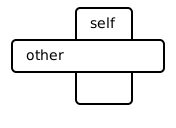
- blocks(other)[source]
- Parameters:
other (Point[T1, T2]) – The other parameter is an object of the same type as self. It represents another instance of the class that the blocks method belongs to
- Return type:
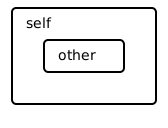
- contains(other)[source]
The function checks if the x and y coordinates of one object are contained within the x and y coordinates of another object.
- Parameters:
other (Point[T1, T2]) – The “other” parameter is an object of the same class as the current object. It represents another instance of the class that we want to check if it is contained within the current instance
- Returns:
The contains method is returning a boolean value.
- Return type:
Examples
>>> a = Point(3, 4)
>>> b = Point(5, 6)
>>> print(a.contains(b))
False
>>> c = Point(3, 4)
>>> d = Point(3, 4)
>>> print(c.contains(d))
True
>>> from physdes.interval import Interval
>>> r = Point(Interval(3, 4), Interval(5, 6)) # Rectangle
>>> print(r.contains(a))
False
- displace(rhs)[source]
Calculates the displacement vector from another point to this point.
This method takes another Point object (rhs) as input and returns a Vector2 object representing the displacement from rhs to the current point (self).
- Parameters:
rhs (Point[T1, T2]) – The other point from which to calculate the displacement.
- Returns:
A Vector2 object representing the displacement.
- Return type:
Examples
>>> a = Point(3, 4)
>>> b = Point(1, 1)
>>> print(a.displace(b))
<2, 3>
>>> c = Point(5, 6)
>>> print(b.displace(c))
<-4, -5>
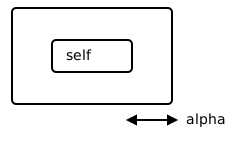
- enlarge_with(alpha)[source]
Enlarges the point by a given amount in each dimension.
This method takes a numerical value alpha and enlarges the point by that amount in both the x and y dimensions. If the point’s coordinates are single values, they are converted into intervals. The result is a new object of the same type as self (e.g., a Point with Interval coordinates, representing a rectangle).
- Parameters:
alpha (float) – The amount to enlarge the point by. This can be an integer or a float.
- Returns:
A new object of the same type as self with enlarged coordinates.
- Return type:
Examples
>>> a = Point(9, -1)
>>> r = a.enlarge_with(1)
>>> print(r)
([8, 10], [-2, 0])
>>> r = a.enlarge_with(2)
>>> print(r)
([7, 11], [-3, 1])
>>> r = a.enlarge_with(0)
>>> print(r)
([9, 9], [-1, -1])
- flip()[source]
The flip function returns a new Point object with the x and y coordinates swapped.
- Returns:
The flip() method returns a new Point object with the x and y coordinates swapped.
- Return type:
Point[T2, T1]
Examples
>>> a = Point(3, 4)
>>> print(a.flip())
(4, 3)
>>> from physdes.interval import Interval
>>> r = Point(Interval(3, 4), Interval(5, 6))  # Rectangle
>>> print(r.flip())
([5, 6], [3, 4])
- get_center()[source]
Calculates the center of the point.
Examples
>>> a = Point(3, 4)
>>> a.get_center()
Point(3, 4)
>>> from physdes.interval import Interval
>>> a = Point(Interval(3, 7), 4)
>>> a.get_center()
Point(5, 4)
- height()[source]
Calculates the height of the point.
- Returns:
The height of the point.
- Return type:
Examples
>>> a = Point(3, 4)
>>> a.height()
1
>>> b = Point(3, 8)
>>> b.height()
1
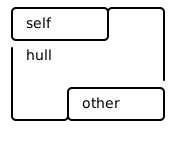
- hull_with(other)[source]
The hull_with function takes another object and returns a new object with the hull of the x and y coordinates of both objects.
- Parameters:
other (Point[T1, T2]) – The other parameter is an object of the same type as self. It represents another instance of the class that the hull_with method belongs to
- Returns:
an instance of the same class as self (type T). The instance is created using the hull function, which takes the x-coordinates and y-coordinates of self and other as arguments.
- Return type:
Examples
>>> a = Point(3, 4)
>>> b = Point(5, 6)
>>> print(a.hull_with(b))
([3, 5], [4, 6])
>>> from physdes.interval import Interval
>>> r = Point(Interval(3, 4), Interval(5, 6)) # Rectangle
>>> print(r.hull_with(r))
([3, 4], [5, 6])
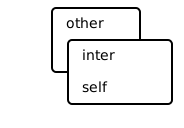
- intersect_with(other)[source]
The function intersect_with takes another object as input and returns a new object that represents the intersection of the x and y coordinates of the two objects.
- Parameters:
other (Point[T1, T2]) – The “other” parameter is an object of the same type as the current object. It represents another instance of the class that has the same attributes and methods
- Returns:
The method intersect_with returns an instance of the same class as self (i.e., type(self)). The instance is created using the T constructor and takes the intersection of the xcoord and ycoord attributes of self and other.
- Return type:
Examples
>>> a = Point(3, 5)
>>> b = Point(4, 6)
>>> print(a.intersect_with(a))
(3, 5)
>>> from physdes.interval import Interval
>>> r = Point(Interval(3, 4), Interval(5, 6)) # Rectangle
>>> print(r.intersect_with(a))
([3, 3], [5, 5])
>>> r = Point(Interval(3, 4), Interval(5, 6)) # Rectangle
>>> print(r.intersect_with(b))
([4, 4], [6, 6])
>>> r = Point(Interval(3, 4), Interval(5, 6)) # Rectangle
>>> print(r.intersect_with(r))
([3, 4], [5, 6])
- inv_rotates()[source]
Inverse rotation of the point by 45 degrees (rotates back to original space).
This is the inverse transformation of rotates(). It converts Manhattan (rotated) coordinates back to regular Cartesian coordinates.
- Returns:
A new Point with inverse-rotated coordinates.
- Return type:
Point[T1, T2]
Examples
>>> a = Point(3, 4)
>>> print(a.inv_rotates())
(3, 0)
>>> from physdes.interval import Interval
>>> r = Point(Interval(3, 4), Interval(5, 6))  # Rectangle
>>> print(r.inv_rotates())
([4, 5], [0, 1])
- lower_corner()[source]
Calculates the lower corner of the point.
Examples
>>> a = Point(3, 4)
>>> a.lower_corner()
Point(3, 4)
>>> from physdes.interval import Interval
>>> a = Point(Interval(3, 7), 4)
>>> a.lower_corner()
Point(3, 4)
- measure()[source]
Calculates the measure (area, volume etc.) of the point.
- Returns:
The measure (area, volume etc.) of the point.
- Return type:
Examples
>>> a = Point(3, 4)
>>> a.measure()
1
>>> b = Point(3, 8)
>>> b.measure()
1
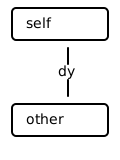
- min_dist_with(other)[source]
The function calculates the minimum Manhattan distance between two points using their x and y coordinates.
- Parameters:
other (Point[T1, T2]) – The “other” parameter represents another object or point with which you want to calculate the minimum Manhattan distance. It is assumed that both the current object (self) and the other object have attributes xcoord and ycoord, which represent their respective x and y coordinates. The function calculates the minimum Manhattan distance between the
- Returns:
the sum of the minimum distances between the x-coordinates and the y-coordinates of two objects.
- Return type:
Examples
>>> a = Point(3, 4)
>>> b = Point(5, 6)
>>> print(a.min_dist_with(b))
4
>>> from physdes.interval import Interval
>>> r = Point(Interval(3, 4), Interval(5, 6)) # Rectangle
>>> print(r.min_dist_with(a))
1
>>> r = Point(Interval(3, 4), Interval(5, 6)) # Rectangle
>>> print(r.min_dist_with(b))
1
>>> r = Point(Interval(3, 4), Interval(5, 6)) # Rectangle
>>> print(r.min_dist_with(r))
0
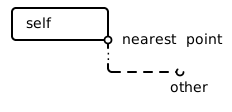
- nearest_to(other)[source]
Calculates the point on this object that is nearest to another point.
This method takes another Point object (other) and returns a new Point representing the location on the boundary or inside of self that is closest to other. This is particularly useful when self represents a geometric shape (like a rectangle, represented by a Point of Intervals) and other is a point.
- Parameters:
other (Point) – The other point to find the nearest location to.
- Returns:
A new Point object representing the nearest point on self.
- Return type:
Examples
>>> a = Point(3, 4)
>>> b = Point(5, 6)
>>> print(a.nearest_to(b))
(3, 4)
>>> from physdes.interval import Interval
>>> r = Point(Interval(3, 4), Interval(5, 6)) # Rectangle
>>> print(r.nearest_to(a))
(3, 5)
>>> r = Point(Interval(3, 4), Interval(5, 6)) # Rectangle
>>> print(r.nearest_to(b))
(4, 6)
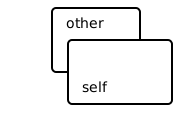
- overlaps(other)[source]
The overlaps function checks if two objects overlap by comparing their x and y coordinates.
- Parameters:
other (Point[T1, T2]) – The other parameter represents another object that we want to check for overlap with the current object
- Returns:
a boolean value, indicating whether there is an overlap between the coordinates of the two objects.
- Return type:
Examples
>>> a = Point(3, 4)
>>> b = Point(5, 6)
>>> print(a.overlaps(b))
False
>>> c = Point(3, 4)
>>> d = Point(3, 4)
>>> print(c.overlaps(d))
True
>>> from physdes.interval import Interval
>>> r = Point(Interval(3, 4), Interval(5, 6))  # Rectangle
>>> print(r.overlaps(a))
False
- rotates()[source]
Rotates the point by 45 degrees clockwise in the coordinate space.
This transformation is used for converting between regular Cartesian coordinates and Manhattan (rotated) coordinates, which is useful for certain geometric calculations.
- Returns:
A new Point with rotated coordinates.
- Return type:
Point[T1, T2]
Examples
>>> a = Point(3, 4)
>>> print(a.rotates())
(-1, 7)
>>> from physdes.interval import Interval
>>> r = Point(Interval(3, 4), Interval(5, 6))  # Rectangle
>>> print(r.rotates())
([-2, -2], [8, 10])
- upper_corner()[source]
Calculates the upper corner of the point.
Examples
>>> a = Point(3, 4)
>>> a.upper_corner()
Point(3, 4)
>>> from physdes.interval import Interval
>>> a = Point(Interval(3, 7), 4)
>>> a.upper_corner()
Point(7, 4)
- width()[source]
Calculates the width of the point.
- Returns:
The width of the point.
- Return type:
Examples
>>> a = Point(3, 4)
>>> a.width()
1
>>> b = Point(3, 8)
>>> b.width()
1
- xcoord: T1
- ycoord: T2
physdes.polygon module
Polygon Module (srcphysdespolygon.py)
This code defines a Polygon class and related functions for working with polygons in a 2D space. The purpose of this module is to provide tools for creating, manipulating, and analyzing polygons.
The Polygon class represents a polygon using a list of points (vertices). It takes a list of Point objects as input when creating a new Polygon. The class provides methods for basic operations like adding or subtracting vectors from the polygon (which moves it), calculating its area, and comparing polygons for equality.
The module also includes several functions for creating special types of polygons:
create_mono_polygon: Creates a monotone polygon, which means the polygon is sorted in a specific direction.
create_ymono_polygon: Creates a y-monotone polygon, sorted based on y-coordinates.
create_xmono_polygon: Creates an x-monotone polygon, sorted based on x-coordinates.
create_test_polygon: Creates a test polygon with a specific shape for testing purposes.
One of the key functions in this module is point_in_polygon, which determines whether a given point is inside a polygon. This function takes a list of points representing the polygon and a single point to check. It returns a boolean value: True if the point is inside the polygon, and False if it's outside.
The point_in_polygon function uses a clever algorithm called the ray-casting algorithm. It works by imagining a horizontal line (ray) extending from the point to the right. It then counts how many times this line intersects with the edges of the polygon. If the number of intersections is odd, the point is inside the polygon; if it's even, the point is outside.
Throughout the code, there are several important data transformations happening. For example, when creating a Polygon, the input points are converted into vectors relative to the first point (the origin). This makes it easier to perform calculations and transformations on the polygon.
The module uses generic types (T) for coordinates, allowing it to work with both integer and floating-point coordinates. This flexibility makes the code more versatile and reusable in different contexts.
Overall, this module provides a comprehensive set of tools for working with polygons, from basic creation and manipulation to more complex operations like determining if a point is inside a polygon. It's designed to be flexible and efficient, making it useful for various applications involving 2D geometry.
- class physdes.polygon.Polygon(origin, vecs)[source]
Bases:
Generic[T]- classmethod __class_getitem__(params)
Parameterizes a generic class.
At least, parameterizing a generic class is the main thing this method does. For example, for some generic class Foo, this is called when we do Foo[int] - there, with cls=Foo and params=int.
However, note that this method is also called when defining generic classes in the first place with class Foo(Generic[T]): ….
- __eq__(rhs)[source]
The __eq__ method compares two Polygon objects and returns a boolean value indicating whether they are equal or not.
- Parameters:
rhs (object) – The parameter rhs is of type object. It represents the right-hand side of the equality comparison.
- Returns:
The method is returning a boolean value.
- Return type:
Examples
>>> coords = [
...     (0, -4),
...     (0, -1),
...     (3, -3),
...     (5, 1),
...     (2, 2),
...     (3, 3),
...     (1, 4),
...     (-2, 4),
...     (-2, 2),
...     (-4, 3),
...     (-5, 1),
...     (-6, -2),
...     (-3, -3),
...     (-3, -4),
... ]
...
>>> S = [Point(xcoord, ycoord) for xcoord, ycoord in coords]
>>> P = Polygon.from_pointset(S)
>>> Q = Polygon.from_pointset(S)
>>> print(P == Q)
True
>>> R = Polygon.from_pointset(S[1:] + [S[0]])
>>> print(P == R)
False
- __iadd__(rhs)[source]
The __iadd__ method adds a Vector2 to the _origin attribute of the Polygon object and returns itself.
- Parameters:
rhs (Vector2) – The parameter rhs is of type Vector2. It represents the right-hand side of the addition operation
- Returns:
The method is returning self, which is an instance of the Polygon[T] class.
- Return type:
Polygon[T]
Examples
>>> coords = [
...     (0, -4),
...     (0, -1),
...     (3, -3),
...     (5, 1),
...     (2, 2),
...     (3, 3),
...     (1, 4),
...     (-2, 4),
...     (-2, 2),
...     (-4, 3),
...     (-5, 1),
...     (-6, -2),
...     (-3, -3),
...     (-3, -4),
... ]
...
>>> S = [Point(xcoord, ycoord) for xcoord, ycoord in coords]
>>> P = Polygon.from_pointset(S)
>>> P += Vector2(1, 1)
>>> print(P._origin)
(1, -3)
>>> print(P._vecs[0])
<0, 3>
- __init__(origin, vecs)[source]
The function initializes an object with the given first point and a given vector set.
Examples
>>> coords = [
...     (0, -4),
...     (0, -1),
...     (3, -3),
...     (5, 1),
...     (2, 2),
...     (3, 3),
...     (1, 4),
...     (-2, 4),
...     (-2, 2),
...     (-4, 3),
...     (-5, 1),
...     (-6, -2),
...     (-3, -3),
...     (-3, -4),
... ]
...
>>> S = [Vector2(xcoord, ycoord) for xcoord, ycoord in coords]
>>> P = Polygon(Point(400, 500), S)
>>> print(P._origin)
(400, 500)
>>> print(P._vecs[0])
<0, -4>
- __isub__(rhs)[source]
The __isub__ method subtracts a Vector2 from the _origin attribute of the Polygon object and returns itself.
- Parameters:
rhs (Vector2) – The parameter rhs is of type Vector2. It represents the right-hand side of the subtraction operation
- Returns:
The method is returning self, which is an instance of the Polygon[T] class.
- Return type:
Polygon[T]
Examples
>>> coords = [
...     (0, -4),
...     (0, -1),
...     (3, -3),
...     (5, 1),
...     (2, 2),
...     (3, 3),
...     (1, 4),
...     (-2, 4),
...     (-2, 2),
...     (-4, 3),
...     (-5, 1),
...     (-6, -2),
...     (-3, -3),
...     (-3, -4),
... ]
...
>>> S = [Point(xcoord, ycoord) for xcoord, ycoord in coords]
>>> P = Polygon.from_pointset(S)
>>> P -= Vector2(1, 1)
>>> print(P._origin)
(-1, -5)
>>> print(P._vecs[0])
<0, 3>
- classmethod from_pointset(pointset)[source]
The function initializes an object with a given point set, setting the origin to the first point and creating a list of vectors by displacing each point from the origin.
- Parameters:
pointset (PointSet) – The pointset parameter is of type PointSet. It is a collection of points that represents a set of vertices. The first element of the pointset is considered as the origin point, and the remaining elements are considered as displacement vectors from the origin
- Return type:
Polygon[T]
Examples
>>> coords = [
...     (0, -4),
...     (0, -1),
...     (3, -3),
...     (5, 1),
...     (2, 2),
...     (3, 3),
...     (1, 4),
...     (-2, 4),
...     (-2, 2),
...     (-4, 3),
...     (-5, 1),
...     (-6, -2),
...     (-3, -3),
...     (-3, -4),
... ]
...
>>> S = [Point(xcoord, ycoord) for xcoord, ycoord in coords]
>>> P = Polygon.from_pointset(S)
>>> print(P._origin)
(0, -4)
>>> print(P._vecs[0])
<0, 3>
- is_anticlockwise()[source]
Check if the polygon is clockwise.
- Returns:
True if the polygon is clockwise, False otherwise.
- Return type:
Examples
>>> from .point import Point
>>> from .polygon import Polygon
>>> coords = [
...     (0, 0),
...     (1, 0),
...     (1, 1),
...     (0, 1),
... ]
>>> S = [Point(xcoord, ycoord) for xcoord, ycoord in coords]
>>> P = Polygon.from_pointset(S)
>>> P.is_anticlockwise()
True
- is_convex(is_anticlockwise=None)[source]
Check if the polygon is convex.
A polygon is convex if all its interior angles are less than or equal to 180 degrees. This can be determined by checking the cross product of consecutive edges. If all cross products have the same sign, the polygon is convex.
- Returns:
True if the polygon is convex, False otherwise.
- Return type:
Examples
>>> from .point import Point
>>> from .polygon import Polygon
>>> coords = [
...     (0, 0),
...     (1, 0),
...     (1, 1),
...     (0, 1),
... ]
>>> S = [Point(xcoord, ycoord) for xcoord, ycoord in coords]
>>> P = Polygon.from_pointset(S)
>>> P.is_convex()
True
- is_rectilinear()[source]
The is_rectilinear function checks if a polygon is rectilinear.
- Returns:
The is_rectilinear method returns a boolean value.
- Return type:
Examples
>>> coords = [(0, 0), (0, 1), (1, 1), (1, 0)]
>>> S = [Point(x, y) for x, y in coords]
>>> P = Polygon.from_pointset(S)
>>> P.is_rectilinear()
True
>>> coords = [(0, 0), (0, 1), (1, 1), (1, 0), (0.5, 0.5)]
>>> S = [Point(x, y) for x, y in coords]
>>> P = Polygon.from_pointset(S)
>>> P.is_rectilinear()
False
- property signed_area_x2: Any
The signed_area_x2 function calculates the signed area of a polygon multiplied by 2.
- Returns:
The signed_area_x2 method returns the signed area of the polygon multiplied by 2.
Examples
>>> coords = [
...     (0, -4),
...     (0, -1),
...     (3, -3),
...     (5, 1),
...     (2, 2),
...     (3, 3),
...     (1, 4),
...     (-2, 4),
...     (-2, 2),
...     (-4, 3),
...     (-5, 1),
...     (-6, -2),
...     (-3, -3),
...     (-3, -4),
... ]
...
>>> S = [Point(xcoord, ycoord) for xcoord, ycoord in coords]
>>> P = Polygon.from_pointset(S)
>>> P.signed_area_x2
110
- physdes.polygon.create_mono_polygon(lst, dir)[source]
The create_mono_polygon function creates a monotone polygon for a given point set by partitioning the points based on a direction and sorting them.
- Parameters:
lst (PointSet) – A list of points representing a point set. Each point is represented as a tuple of two integers, (x, y), where x and y are the coordinates of the point
dir (Callable) – The dir parameter is a callable function that determines the direction in which the points are sorted. It takes a point as input and returns a value that represents the direction. The points are sorted based on this direction
- Returns:
The create_mono_polygon function returns a list of points representing a monotone polygon.
- Return type:
PointSet
Examples
>>> coords = [
...     (-2, 2),
...     (0, -1),
...     (-5, 1),
...     (-2, 4),
...     (0, -4),
...     (-4, 3),
...     (-6, -2),
...     (5, 1),
...     (2, 2),
...     (3, -3),
...     (-3, -3),
...     (3, 3),
...     (-3, -4),
...     (1, 4),
...     (-2, 4),
...     (-2, 2),
...     (-4, 3),
...     (-5, 1),
...     (-6, -2),
...     (-3, -3),
...     (-3, -4),
...     (1, 4),
...     (-2, 4),
... ]
...
>>> S = [Point(xcoord, ycoord) for xcoord, ycoord in coords]
>>> _ = create_mono_polygon(S, lambda pt: (pt.ycoord, pt.xcoord))
- physdes.polygon.create_test_polygon(lst)[source]
Create a test polygon for a given point set.
The create_test_polygon function takes a point set as input and returns a test polygon created from that point set.
- Parameters:
lst (PointSet) – The parameter lst is a PointSet, which is a collection of points. Each point in the PointSet has an xcoord and ycoord attribute, representing its coordinates
- Returns:
The function create_test_polygon returns a PointSet, which is a list of Point objects.
- Return type:
Examples
>>> coords = [
...     (-2, 2),
...     (0, -1),
...     (-5, 1),
...     (-2, 4),
...     (0, -4),
...     (-4, 3),
...     (-6, -2),
...     (5, 1),
...     (2, 2),
...     (3, -3),
...     (-3, -3),
...     (3, 3),
...     (-3, -4),
...     (1, 4),
... ]
...
>>> S = [Point(xcoord, ycoord) for xcoord, ycoord in coords]
>>> S = create_test_polygon(S)
>>> for p in S:
...     print("{},".format(p))
...
(0, -4),
(0, -1),
(3, -3),
(5, 1),
(2, 2),
(3, 3),
(1, 4),
(-2, 4),
(-2, 2),
(-4, 3),
(-5, 1),
(-6, -2),
(-3, -3),
(-3, -4),
- physdes.polygon.create_xmono_polygon(lst)[source]
The function creates a x-monotone polygon from a given point set.
- Parameters:
lst (PointSet) – The parameter lst is a PointSet, which is a collection of points
- Returns:
The function create_xmono_polygon returns a PointSet object.
- Return type:
Examples
>>> coords = [
...     (-2, 2),
...     (0, -1),
...     (-5, 1),
...     (-2, 4),
...     (0, -4),
...     (-4, 3),
...     (-6, -2),
...     (5, 1),
...     (2, 2),
...     (3, -3),
...     (-3, -3),
...     (3, 3),
...     (-3, -4),
...     (1, 4),
... ]
...
>>> S = [Point(xcoord, ycoord) for xcoord, ycoord in coords]
>>> _ = create_xmono_polygon(S)
- physdes.polygon.create_ymono_polygon(lst)[source]
The function creates a y-monotone polygon from a given point set.
- Parameters:
lst (PointSet) – The parameter lst is a PointSet, which is a collection of points
- Returns:
The function create_ymono_polygon returns a PointSet object.
- Return type:
Examples
>>> coords = [
...     (-2, 2),
...     (0, -1),
...     (-5, 1),
...     (-2, 4),
...     (0, -4),
...     (-4, 3),
...     (-6, -2),
...     (5, 1),
...     (2, 2),
...     (3, -3),
...     (-3, -3),
...     (3, 3),
...     (-3, -4),
...     (1, 4),
... ]
...
>>> S = [Point(xcoord, ycoord) for xcoord, ycoord in coords]
>>> _ = create_ymono_polygon(S)
- physdes.polygon.partition(pred, iterable)[source]
Use a predicate to partition entries into true entries and false entries
Examples
>>> is_odd = lambda x: x % 2 != 0
>>> partition(is_odd, range(10))
([1, 3, 5, 7, 9], [0, 2, 4, 6, 8])
- physdes.polygon.point_in_polygon(pointset, ptq)[source]
The function point_in_polygon determines if a given point is within a polygon.
The code below is from Wm. Randolph Franklin <wrf@ecse.rpi.edu> (see URL below) with some minor modifications for integer. It returns true for strictly interior points, false for strictly exterior, and ub for points on the boundary. The boundary behavior is complex but determined; in particular, for a partition of a region into polygons, each Point is “in” exactly one Polygon. (See p.243 of [O’Rourke (C)] for a discussion of boundary behavior.)
See http://www.faqs.org/faqs/graphics/algorithms-faq/ Subject 2.03
- Parameters:
pointset (PointSet) – The pointset parameter is a list of points that define the vertices of a polygon. Each point in the list is an instance of the Point class, which has xcoord and ycoord attributes representing the x and y coordinates of the point
ptq (Point[T, T]) – ptq is a Point object representing the point to be checked if it is within the polygon
- Returns:
a boolean value indicating whether the given point ptq is within the polygon defined by the pointset.
- Return type:
Examples
>>> coords = [
...     (0, -4),
...     (0, -1),
...     (3, -3),
...     (5, 1),
...     (2, 2),
...     (3, 3),
...     (1, 4),
...     (-2, 4),
...     (-2, 2),
...     (-4, 3),
...     (-5, 1),
...     (-6, -2),
...     (-3, -3),
...     (-3, -4),
... ]
...
>>> pointset = [Point(xcoord, ycoord) for xcoord, ycoord in coords]
>>> point_in_polygon(pointset, Point(0, 1))
True
>>> point_in_polygon(pointset, Point(0, -4))
False
>>> point_in_polygon(pointset, Point(-6, -2))
True
>>> point_in_polygon(pointset, Point(0, 0))
True
>>> point_in_polygon(pointset, Point(10, 10))
False
- physdes.polygon.polygon_is_anticlockwise(pointset)[source]
Determines if a polygon represented by a list of points is oriented anticlockwise.
- Parameters:
pointset (List[Point[Any, Any]]) – The list of points representing the polygon.
- Returns:
True if the polygon is oriented anticlockwise, False otherwise.
- Return type:
Examples
>>> from .point import Point
>>> pointset = [Point(0, 0), Point(1, 0), Point(1, 1), Point(0, 1)]
>>> polygon_is_anticlockwise(pointset)
True
- physdes.polygon.polygon_is_anticlockwise_info(pointset)[source]
Determines if a polygon represented by a list of points is oriented clockwise.
- Parameters:
pointset (List[Point[Any, Any]]) – The list of points representing the polygon.
- Returns:
True if the polygon is oriented clockwise, False otherwise.
- Return type:
Examples
>>> from .point import Point
>>> pointset = [Point(0, 0), Point(1, 0), Point(1, 1), Point(0, 1)]
>>> polygon_is_anticlockwise_info(pointset)
(True, 0)
- physdes.polygon.polygon_is_monotone(lst, dir)[source]
Check if a polygon is monotone in a given direction.
- Parameters:
- Returns:
True if the polygon is monotone, False otherwise.
- Return type:
Examples
>>> from .point import Point
>>> lst = [Point(0, 0), Point(1, 0), Point(1, 1), Point(0, 1)]
>>> polygon_is_monotone(lst, lambda p: (p.xcoord, p.ycoord))
True
>>> lst = [Point(0, 0), Point(1, 1), Point(0, 1), Point(1, 0)]
>>> polygon_is_monotone(lst, lambda p: (p.xcoord, p.ycoord))
False
- physdes.polygon.polygon_is_xmonotone(lst)[source]
Check if a polygon is x-monotone.
- Parameters:
lst (List[Point[Any, Any]]) – A list of points representing the vertices of the polygon.
- Returns:
True if the polygon is x-monotone, False otherwise.
- Return type:
Examples
>>> from .point import Point
>>> lst = [Point(0, 0), Point(1, 0), Point(1, 1), Point(0, 1)]
>>> polygon_is_xmonotone(lst)
True
>>> lst = [Point(0, 0), Point(1, 1), Point(0, 1), Point(1, 0)]
>>> polygon_is_xmonotone(lst)
False
- physdes.polygon.polygon_is_ymonotone(lst)[source]
Check if a polygon is y-monotone.
- Parameters:
lst (List[Point[Any, Any]]) – A list of points representing the vertices of the polygon.
- Returns:
True if the polygon is y-monotone, False otherwise.
- Return type:
Examples
>>> from .point import Point
>>> lst = [Point(0, 0), Point(1, 0), Point(1, 1), Point(0, 1)]
>>> polygon_is_ymonotone(lst)
True
>>> lst = [Point(0, 0), Point(1, 1), Point(1, 0), Point(0, 1)]
>>> polygon_is_ymonotone(lst)
False
- physdes.polygon.polygon_make_convex_hull(pointset)[source]
Computes the convex hull of a set of points.
- Parameters:
- Returns:
A list of points representing the convex hull of the input points.
- Return type:
Examples
>>> from .point import Point
>>> pointset = [Point(0, 0), Point(1, 0), Point(1, 1), Point(0, 1), Point(0.5, 0.5)]
>>> hull = polygon_make_convex_hull(pointset)
>>> len(hull)
4
>>> coords = [
...     (0, -4), (0, -1), (3, -3), (5, 1), (2, 2), (3, 3),
...     (1, 4), (-2, 4), (-2, 2), (-4, 3), (-5, 1), (-6, -2),
...     (-3, -3), (-3, -4)
... ]
>>> pointset = [Point(x, y) for x, y in coords]
>>> hull = polygon_make_convex_hull(pointset)
>>> len(hull)
10
physdes.rdllist module
- class physdes.rdllist.RDllIterator(node)[source]
Bases:
objectThe RobinIterator class is an iterator that iterates over a singly linked list starting from a given node.
Examples
>>> cdll = RDllist(5)
>>> it = RDllIterator(cdll[2])
>>> for vlink in it:
...     print(vlink.data)
3
4
0
1
- __init__(node)[source]
The function initializes the current and stop pointers to the given node.
- Parameters:
node (Dllink[int]) – The node parameter is an instance of the SlNode class. It represents a node in a singly linked list
- __iter__()[source]
The function returns an instance of the RobinIterator class.
- Returns:
The __iter__ method is returning an instance of the RobinIterator class.
- Return type:
- __next__()[source]
The __next__ function returns the next item in the iterator.
- Returns:
The next() method is being called and its return value is being returned.
- Return type:
Dllink[int]
- class physdes.rdllist.RDllist(num_nodes, reverse=False)[source]
Bases:
objectRound-Robin Doubly Linked List implementation
Examples
>>> cdll = RDllist(5)
>>> for vlink in cdll:
...     print(vlink.data)
1
2
3
4
>>> cdll = RDllist(5, reverse=True)
>>> for vlink in cdll:
...     print(vlink.data)
4
3
2
1
- __getitem__(k)[source]
The __getitem__ function returns the item at the given index.
- Parameters:
k (int) – The k parameter is an integer that represents the index of the item to be retrieved
- Returns:
The item at the given index.
- Return type:
Dllink[int]
Examples
>>> cdll = RDllist(5)
>>> cdll[2].data
2
- __init__(num_nodes, reverse=False)[source]
Initialize a Round-Robin doubly linked list. The head node contains no data and serves as a sentinel.
- Parameters:
num_nodes (int) – The num_nodes parameter is an integer that represents the number of parts in the cycle
- __iter__()[source]
The __iter__ function returns an iterator object for a doubly linked list.
- Return type:
- from_node(k)[source]
The from_node function returns an iterator that starts from the given node.
- Parameters:
k (int) – The k parameter is an integer that represents the starting node
- Returns:
An iterator that starts from the given node.
- Return type:
Examples
>>> cdll = RDllist(5)
>>> it = cdll.from_node(2)
>>> for vlink in it:
...     print(vlink.data)
3
4
0
1
physdes.recti module
Rectangle and Segment Classes (srcphysdesrecti.py)
This code defines classes for working with rectangles and line segments in a 2D coordinate system. The main purpose is to provide a way to represent and manipulate these geometric shapes in a program.
The code introduces three main classes: Rectangle, VSegment (vertical segment), and HSegment (horizontal segment). These classes are built on top of more basic classes like Point and Interval, which are imported at the beginning of the file.
The Rectangle class represents a rectangular shape. It takes two inputs when created: an x-coordinate interval and a y-coordinate interval. These intervals define the boundaries of the rectangle. For example, you could create a rectangle from x-coordinates 3 to 4 and y-coordinates 5 to 6.
The Rectangle class provides several useful methods. You can get the lower-left and upper-right corners of the rectangle, check if a point or another rectangle is inside it, calculate its width, height, and area, and even flip it (swap its x and y coordinates).
The VSegment and HSegment classes represent vertical and horizontal line segments, respectively. A VSegment is defined by a single x-coordinate and a y-coordinate interval, while an HSegment is defined by an x-coordinate interval and a single y-coordinate.
These segment classes also have methods to check if they contain a point or another segment, and to flip themselves (turning a vertical segment into a horizontal one, or vice versa).
The code achieves its purpose by using object-oriented programming principles. Each class encapsulates the data and behavior related to its specific geometric shape. The classes inherit from a Point class, which allows them to reuse some common functionality.
An important aspect of the logic is how the classes use the Interval class to represent ranges of coordinates. This allows for easy checking of whether one range contains another, which is crucial for the “contains” methods in each class.
The code doesn’t produce any output on its own. Instead, it provides a set of tools (the classes and their methods) that a programmer can use to work with rectangles and line segments in their own programs. For example, you could use these classes to implement a simple drawing program or to solve geometric problems.
Overall, this code provides a foundation for working with basic 2D geometric shapes in a structured and object-oriented way, making it easier to perform common operations on these shapes in more complex programs.
- class physdes.recti.HSegment(xcoord, ycoord)[source]
Bases:
Point[Interval[int],int]Represents a HSegment.
- __add__(rhs)
The __add__ method allows for addition of a Vector2 object to a Point object, resulting in a new Point object with updated coordinates.
- Parameters:
rhs (Vector2) – rhs is the right-hand side operand of the addition operation. In this case, it is a Vector2 object that is being added to the current Point object
- Returns:
The __add__ method is returning a new instance of the same type as self (which could be Point, Rectangle, or any other type). The new instance is created by adding the x and y coordinates of self with the x and y coordinates of rhs (the right-hand side operand).
- Return type:
Point[T1, T2]
Examples
>>> a = Point(3, 4)
>>> v = Vector2(5, 6)
>>> print(a + v)
(8, 10)
>>> a3d = Point(a, 5)  # Point in 3d
>>> print(a3d + Vector2(v, 1))
((8, 10), 6)
- classmethod __class_getitem__(params)
Parameterizes a generic class.
At least, parameterizing a generic class is the main thing this method does. For example, for some generic class Foo, this is called when we do Foo[int] - there, with cls=Foo and params=int.
However, note that this method is also called when defining generic classes in the first place with class Foo(Generic[T]): ….
- __eq__(other)
The __eq__ function checks if two points have the same x and y coordinates.
- Parameters:
other (object) – The other parameter represents the other object that we are comparing with the current object. In this case, it is used to compare the x and y coordinates of two Point objects to determine if they are equal
- Returns:
The __eq__ method is returning a boolean value indicating whether the coordinates of the current point object (self) are equal to the coordinates of the other point object (other).
- Return type:
Examples
>>> a = Point(3, 4)
>>> b = Point(5, 6)
>>> a == b
False
>>> a3d = Point(a, 5)  # Point in 3d
>>> b3d = Point(b, 1)  # Point in 3d
>>> a3d != b3d
True
>>> a != b
True
- __iadd__(rhs)
The __iadd__ method allows for in-place addition of a Vector2 object to a Point object.
- Parameters:
rhs (Vector2) – The parameter rhs stands for “right-hand side” and represents the vector that is being added to the current vector
- Returns:
The self object is being returned.
- Return type:
Point[T1, T2]
Examples
>>> a = Point(3, 4)
>>> v = Vector2(5, 6)
>>> a += v
>>> print(a)
(8, 10)
>>> a3d = Point(a, 5)  # Point in 3d
>>> a3d += Vector2(v, 1)
>>> print(a3d)
((13, 16), 6)
- __init__(xcoord, ycoord)
The function initializes an object with x and y coordinates.
- Parameters:
xcoord (T1) – The parameter xcoord is of type T1 and represents the x-coordinate of a point
ycoord (T2) – The ycoord parameter is a variable that represents the y-coordinate of a point. It can be of any type (T2)
Examples
>>> a = Point(3, 4)
>>> print(a)
(3, 4)
>>> a3d = Point(a, 5)  # Point in 3d
>>> print(a3d)
((3, 4), 5)
- __isub__(rhs)
The __isub__ method subtracts the x and y coordinates of a Vector2 object from the x and y coordinates of a Point object and returns the updated Point object.
- Parameters:
rhs (Vector2) – The parameter rhs stands for “right-hand side” and represents the vector that is being subtracted from the current vector. In this case, rhs is an instance of the Vector2 class
- Returns:
The method __isub__ returns self.
- Return type:
Point[T1, T2]
Examples
>>> a = Point(3, 4)
>>> v = Vector2(5, 6)
>>> a -= v
>>> print(a)
(-2, -2)
>>> a3d = Point(a, 5)  # Point in 3d
>>> a3d -= Vector2(v, 1)
>>> print(a3d)
((-7, -8), 4)
- __le__(other)
The __le__ function compares two points and returns True if the first point is less than or equal to the second point based on their x and y coordinates.
- Parameters:
other (Point[T1, T2]) – The other parameter represents another instance of the Point class that we are comparing to the current instance
- Returns:
The method __le__ is returning a boolean value.
- Return type:
Examples
>>> a = Point(3, 4)
>>> b = Point(5, 6)
>>> a <= b
True
>>> a3d = Point(a, 5)  # Point in 3d
>>> b3d = Point(b, 1)  # Point in 3d
>>> a3d >= b3d
False
>>> b >= a
True
- __lt__(other)
The __lt__ function compares two points based on their x and y coordinates and returns True if the first point is less than the second point.
- Parameters:
other (Point[T1, T2]) – The other parameter represents another instance of the Point class that we are comparing to the current instance
- Returns:
The __lt__ method is returning a boolean value indicating whether the current instance is less than the other instance.
- Return type:
Examples
>>> a = Point(3, 4)
>>> b = Point(5, 6)
>>> a < b
True
>>> a3d = Point(a, 5)  # Point in 3d
>>> b3d = Point(b, 1)  # Point in 3d
>>> a3d > b3d
False
>>> b > a
True
- __repr__()
The __repr__ function returns a string representation of a Point object, including the class name and its coordinates.
- Returns:
The __repr__ method is returning a string representation of the Point object. The string includes the class name, and the x and y coordinates of the point
- Return type:
Examples
>>> a = Point(3, 4)
>>> repr(a)
'Point(3, 4)'
>>> a3d = Point(a, 5)  # Point in 3d
>>> repr(a3d)
'Point(Point(3, 4), 5)'
- __str__()
The __str__ function returns a string representation of a Point object in the format (xcoord, ycoord).
- Returns:
The __str__ method is returning a string representation of the object, which is the coordinates of the point in the format “(x, y)”.
- Return type:
Examples
>>> a = Point(3, 4)
>>> print(a)
(3, 4)
>>> a3d = Point(a, 5)  # Point in 3d
>>> print(a3d)
((3, 4), 5)
- __sub__(rhs)
The __sub__ method subtracts the x and y coordinates of a given vector or point from the x and y coordinates of the current object and returns a new object of the same type.
- Parameters:
rhs (Vector2) – The parameter rhs represents the right-hand side operand of the subtraction operation. It can be either a Vector2 or a Point object
- Returns:
The __sub__ method returns a new instance of the same type as self (which could be Point, Rectangle, or any other type) with the x and y coordinates subtracted by the corresponding coordinates of rhs (another Vector2 or Point).
- Return type:
Point[T1, T2]
Examples
>>> a = Point(3, 4)
>>> v = Vector2(5, 6)
>>> b = a - v
>>> print(b)
(-2, -2)
- blocks(other)
- Parameters:
other (Point[T1, T2]) – The other parameter is an object of the same type as self. It represents another instance of the class that the blocks method belongs to
- Return type:
- contains(other)[source]
The contains function checks if a given object is contained within another object based on their coordinates.
- Parameters:
other (Point[Interval[int], int]) – The other parameter represents another object that we want to check if it is contained within the current object. It can be either a Point or a HSegment object
- Returns:
The function contains returns a boolean value indicating whether other is contained within self.
- Return type:
Examples
>>> a = HSegment(Interval(30, 40), 5)
>>> a.contains(Point(33, 5))
True
>>> a.contains(HSegment(Interval(33, 38), 5))
True
>>> a.contains(HSegment(Interval(33, 38), 6))
False
>>> a.contains(Point(33, 6))
False
- displace(rhs)
Calculates the displacement vector from another point to this point.
This method takes another Point object (rhs) as input and returns a Vector2 object representing the displacement from rhs to the current point (self).
- Parameters:
rhs (Point[T1, T2]) – The other point from which to calculate the displacement.
- Returns:
A Vector2 object representing the displacement.
- Return type:
Examples
>>> a = Point(3, 4)
>>> b = Point(1, 1)
>>> print(a.displace(b))
<2, 3>
>>> c = Point(5, 6)
>>> print(b.displace(c))
<-4, -5>
- enlarge_with(alpha)
Enlarges the point by a given amount in each dimension.
This method takes a numerical value alpha and enlarges the point by that amount in both the x and y dimensions. If the point’s coordinates are single values, they are converted into intervals. The result is a new object of the same type as self (e.g., a Point with Interval coordinates, representing a rectangle).
- Parameters:
alpha (float) – The amount to enlarge the point by. This can be an integer or a float.
- Returns:
A new object of the same type as self with enlarged coordinates.
- Return type:
Examples
>>> a = Point(9, -1)
>>> r = a.enlarge_with(1)
>>> print(r)
([8, 10], [-2, 0])
>>> r = a.enlarge_with(2)
>>> print(r)
([7, 11], [-3, 1])
>>> r = a.enlarge_with(0)
>>> print(r)
([9, 9], [-1, -1])
- flip()[source]
The flip function returns a VSegment object with the y-coordinate and x-coordinate swapped.
- Returns:
The flip() method is returning a VSegment object.
- Return type:
Note
Overriding the flip method of the Point class.
Examples
>>> a = HSegment(Interval(30, 40), 5)
>>> print(a.flip())
(5, [30, 40])
- get_center()
Calculates the center of the point.
Examples
>>> a = Point(3, 4)
>>> a.get_center()
Point(3, 4)
>>> from physdes.interval import Interval
>>> a = Point(Interval(3, 7), 4)
>>> a.get_center()
Point(5, 4)
- height()
Calculates the height of the point.
- Returns:
The height of the point.
- Return type:
Examples
>>> a = Point(3, 4)
>>> a.height()
1
>>> b = Point(3, 8)
>>> b.height()
1
- hull_with(other)
The hull_with function takes another object and returns a new object with the hull of the x and y coordinates of both objects.
- Parameters:
other (Point[T1, T2]) – The other parameter is an object of the same type as self. It represents another instance of the class that the hull_with method belongs to
- Returns:
an instance of the same class as self (type T). The instance is created using the hull function, which takes the x-coordinates and y-coordinates of self and other as arguments.
- Return type:
Examples
>>> a = Point(3, 4)
>>> b = Point(5, 6)
>>> print(a.hull_with(b))
([3, 5], [4, 6])
>>> from physdes.interval import Interval
>>> r = Point(Interval(3, 4), Interval(5, 6)) # Rectangle
>>> print(r.hull_with(r))
([3, 4], [5, 6])
- intersect_with(other)
The function intersect_with takes another object as input and returns a new object that represents the intersection of the x and y coordinates of the two objects.
- Parameters:
other (Point[T1, T2]) – The “other” parameter is an object of the same type as the current object. It represents another instance of the class that has the same attributes and methods
- Returns:
The method intersect_with returns an instance of the same class as self (i.e., type(self)). The instance is created using the T constructor and takes the intersection of the xcoord and ycoord attributes of self and other.
- Return type:
Examples
>>> a = Point(3, 5)
>>> b = Point(4, 6)
>>> print(a.intersect_with(a))
(3, 5)
>>> from physdes.interval import Interval
>>> r = Point(Interval(3, 4), Interval(5, 6)) # Rectangle
>>> print(r.intersect_with(a))
([3, 3], [5, 5])
>>> r = Point(Interval(3, 4), Interval(5, 6)) # Rectangle
>>> print(r.intersect_with(b))
([4, 4], [6, 6])
>>> r = Point(Interval(3, 4), Interval(5, 6)) # Rectangle
>>> print(r.intersect_with(r))
([3, 4], [5, 6])
- inv_rotates()
Inverse rotation of the point by 45 degrees (rotates back to original space).
This is the inverse transformation of rotates(). It converts Manhattan (rotated) coordinates back to regular Cartesian coordinates.
- Returns:
A new Point with inverse-rotated coordinates.
- Return type:
Point[T1, T2]
Examples
>>> a = Point(3, 4)
>>> print(a.inv_rotates())
(3, 0)
>>> from physdes.interval import Interval
>>> r = Point(Interval(3, 4), Interval(5, 6))  # Rectangle
>>> print(r.inv_rotates())
([4, 5], [0, 1])
- lower_corner()
Calculates the lower corner of the point.
Examples
>>> a = Point(3, 4)
>>> a.lower_corner()
Point(3, 4)
>>> from physdes.interval import Interval
>>> a = Point(Interval(3, 7), 4)
>>> a.lower_corner()
Point(3, 4)
- measure()
Calculates the measure (area, volume etc.) of the point.
- Returns:
The measure (area, volume etc.) of the point.
- Return type:
Examples
>>> a = Point(3, 4)
>>> a.measure()
1
>>> b = Point(3, 8)
>>> b.measure()
1
- min_dist_with(other)
The function calculates the minimum Manhattan distance between two points using their x and y coordinates.
- Parameters:
other (Point[T1, T2]) – The “other” parameter represents another object or point with which you want to calculate the minimum Manhattan distance. It is assumed that both the current object (self) and the other object have attributes xcoord and ycoord, which represent their respective x and y coordinates. The function calculates the minimum Manhattan distance between the
- Returns:
the sum of the minimum distances between the x-coordinates and the y-coordinates of two objects.
- Return type:
Examples
>>> a = Point(3, 4)
>>> b = Point(5, 6)
>>> print(a.min_dist_with(b))
4
>>> from physdes.interval import Interval
>>> r = Point(Interval(3, 4), Interval(5, 6)) # Rectangle
>>> print(r.min_dist_with(a))
1
>>> r = Point(Interval(3, 4), Interval(5, 6)) # Rectangle
>>> print(r.min_dist_with(b))
1
>>> r = Point(Interval(3, 4), Interval(5, 6)) # Rectangle
>>> print(r.min_dist_with(r))
0
- nearest_to(other)
Calculates the point on this object that is nearest to another point.
This method takes another Point object (other) and returns a new Point representing the location on the boundary or inside of self that is closest to other. This is particularly useful when self represents a geometric shape (like a rectangle, represented by a Point of Intervals) and other is a point.
- Parameters:
other (Point) – The other point to find the nearest location to.
- Returns:
A new Point object representing the nearest point on self.
- Return type:
Examples
>>> a = Point(3, 4)
>>> b = Point(5, 6)
>>> print(a.nearest_to(b))
(3, 4)
>>> from physdes.interval import Interval
>>> r = Point(Interval(3, 4), Interval(5, 6)) # Rectangle
>>> print(r.nearest_to(a))
(3, 5)
>>> r = Point(Interval(3, 4), Interval(5, 6)) # Rectangle
>>> print(r.nearest_to(b))
(4, 6)
- overlaps(other)
The overlaps function checks if two objects overlap by comparing their x and y coordinates.
- Parameters:
other (Point[T1, T2]) – The other parameter represents another object that we want to check for overlap with the current object
- Returns:
a boolean value, indicating whether there is an overlap between the coordinates of the two objects.
- Return type:
Examples
>>> a = Point(3, 4)
>>> b = Point(5, 6)
>>> print(a.overlaps(b))
False
>>> c = Point(3, 4)
>>> d = Point(3, 4)
>>> print(c.overlaps(d))
True
>>> from physdes.interval import Interval
>>> r = Point(Interval(3, 4), Interval(5, 6))  # Rectangle
>>> print(r.overlaps(a))
False
- rotates()
Rotates the point by 45 degrees clockwise in the coordinate space.
This transformation is used for converting between regular Cartesian coordinates and Manhattan (rotated) coordinates, which is useful for certain geometric calculations.
- Returns:
A new Point with rotated coordinates.
- Return type:
Point[T1, T2]
Examples
>>> a = Point(3, 4)
>>> print(a.rotates())
(-1, 7)
>>> from physdes.interval import Interval
>>> r = Point(Interval(3, 4), Interval(5, 6))  # Rectangle
>>> print(r.rotates())
([-2, -2], [8, 10])
- upper_corner()
Calculates the upper corner of the point.
Examples
>>> a = Point(3, 4)
>>> a.upper_corner()
Point(3, 4)
>>> from physdes.interval import Interval
>>> a = Point(Interval(3, 7), 4)
>>> a.upper_corner()
Point(7, 4)
- width()
Calculates the width of the point.
- Returns:
The width of the point.
- Return type:
Examples
>>> a = Point(3, 4)
>>> a.width()
1
>>> b = Point(3, 8)
>>> b.width()
1
- xcoord: T1
- ycoord: T2
- class physdes.recti.Rectangle(xcoord, ycoord)[source]
Bases:
Point[Interval[int],Interval[int]]Axis-parallel Rectangle
- __add__(rhs)
The __add__ method allows for addition of a Vector2 object to a Point object, resulting in a new Point object with updated coordinates.
- Parameters:
rhs (Vector2) – rhs is the right-hand side operand of the addition operation. In this case, it is a Vector2 object that is being added to the current Point object
- Returns:
The __add__ method is returning a new instance of the same type as self (which could be Point, Rectangle, or any other type). The new instance is created by adding the x and y coordinates of self with the x and y coordinates of rhs (the right-hand side operand).
- Return type:
Point[T1, T2]
Examples
>>> a = Point(3, 4)
>>> v = Vector2(5, 6)
>>> print(a + v)
(8, 10)
>>> a3d = Point(a, 5)  # Point in 3d
>>> print(a3d + Vector2(v, 1))
((8, 10), 6)
- classmethod __class_getitem__(params)
Parameterizes a generic class.
At least, parameterizing a generic class is the main thing this method does. For example, for some generic class Foo, this is called when we do Foo[int] - there, with cls=Foo and params=int.
However, note that this method is also called when defining generic classes in the first place with class Foo(Generic[T]): ….
- __eq__(other)
The __eq__ function checks if two points have the same x and y coordinates.
- Parameters:
other (object) – The other parameter represents the other object that we are comparing with the current object. In this case, it is used to compare the x and y coordinates of two Point objects to determine if they are equal
- Returns:
The __eq__ method is returning a boolean value indicating whether the coordinates of the current point object (self) are equal to the coordinates of the other point object (other).
- Return type:
Examples
>>> a = Point(3, 4)
>>> b = Point(5, 6)
>>> a == b
False
>>> a3d = Point(a, 5)  # Point in 3d
>>> b3d = Point(b, 1)  # Point in 3d
>>> a3d != b3d
True
>>> a != b
True
- __iadd__(rhs)
The __iadd__ method allows for in-place addition of a Vector2 object to a Point object.
- Parameters:
rhs (Vector2) – The parameter rhs stands for “right-hand side” and represents the vector that is being added to the current vector
- Returns:
The self object is being returned.
- Return type:
Point[T1, T2]
Examples
>>> a = Point(3, 4)
>>> v = Vector2(5, 6)
>>> a += v
>>> print(a)
(8, 10)
>>> a3d = Point(a, 5)  # Point in 3d
>>> a3d += Vector2(v, 1)
>>> print(a3d)
((13, 16), 6)
- __init__(xcoord, ycoord)[source]
The __init__ function initializes a Rectangle object with x and y coordinates.
- Parameters:
xcoord (Interval) – The x-coordinate interval of the rectangle. It represents the range of x-values that the rectangle spans
ycoord (Interval) – The ycoord parameter represents the interval of values for the y-coordinate of a rectangle. It is an instance of the Interval class, which represents a range of values. The Interval class typically has two attributes, start and end, which define the lower and upper
Examples
>>> a = Rectangle(Interval(3, 4), Interval(5, 6))
>>> print(a)
([3, 4], [5, 6])
>>> a3d = Rectangle(a, Interval(7, 8))  # Rectangle in 3d
>>> print(a3d)
(([3, 4], [5, 6]), [7, 8])
- __isub__(rhs)
The __isub__ method subtracts the x and y coordinates of a Vector2 object from the x and y coordinates of a Point object and returns the updated Point object.
- Parameters:
rhs (Vector2) – The parameter rhs stands for “right-hand side” and represents the vector that is being subtracted from the current vector. In this case, rhs is an instance of the Vector2 class
- Returns:
The method __isub__ returns self.
- Return type:
Point[T1, T2]
Examples
>>> a = Point(3, 4)
>>> v = Vector2(5, 6)
>>> a -= v
>>> print(a)
(-2, -2)
>>> a3d = Point(a, 5)  # Point in 3d
>>> a3d -= Vector2(v, 1)
>>> print(a3d)
((-7, -8), 4)
- __le__(other)
The __le__ function compares two points and returns True if the first point is less than or equal to the second point based on their x and y coordinates.
- Parameters:
other (Point[T1, T2]) – The other parameter represents another instance of the Point class that we are comparing to the current instance
- Returns:
The method __le__ is returning a boolean value.
- Return type:
Examples
>>> a = Point(3, 4)
>>> b = Point(5, 6)
>>> a <= b
True
>>> a3d = Point(a, 5)  # Point in 3d
>>> b3d = Point(b, 1)  # Point in 3d
>>> a3d >= b3d
False
>>> b >= a
True
- __lt__(other)
The __lt__ function compares two points based on their x and y coordinates and returns True if the first point is less than the second point.
- Parameters:
other (Point[T1, T2]) – The other parameter represents another instance of the Point class that we are comparing to the current instance
- Returns:
The __lt__ method is returning a boolean value indicating whether the current instance is less than the other instance.
- Return type:
Examples
>>> a = Point(3, 4)
>>> b = Point(5, 6)
>>> a < b
True
>>> a3d = Point(a, 5)  # Point in 3d
>>> b3d = Point(b, 1)  # Point in 3d
>>> a3d > b3d
False
>>> b > a
True
- __repr__()
The __repr__ function returns a string representation of a Point object, including the class name and its coordinates.
- Returns:
The __repr__ method is returning a string representation of the Point object. The string includes the class name, and the x and y coordinates of the point
- Return type:
Examples
>>> a = Point(3, 4)
>>> repr(a)
'Point(3, 4)'
>>> a3d = Point(a, 5)  # Point in 3d
>>> repr(a3d)
'Point(Point(3, 4), 5)'
- __str__()
The __str__ function returns a string representation of a Point object in the format (xcoord, ycoord).
- Returns:
The __str__ method is returning a string representation of the object, which is the coordinates of the point in the format “(x, y)”.
- Return type:
Examples
>>> a = Point(3, 4)
>>> print(a)
(3, 4)
>>> a3d = Point(a, 5)  # Point in 3d
>>> print(a3d)
((3, 4), 5)
- __sub__(rhs)
The __sub__ method subtracts the x and y coordinates of a given vector or point from the x and y coordinates of the current object and returns a new object of the same type.
- Parameters:
rhs (Vector2) – The parameter rhs represents the right-hand side operand of the subtraction operation. It can be either a Vector2 or a Point object
- Returns:
The __sub__ method returns a new instance of the same type as self (which could be Point, Rectangle, or any other type) with the x and y coordinates subtracted by the corresponding coordinates of rhs (another Vector2 or Point).
- Return type:
Point[T1, T2]
Examples
>>> a = Point(3, 4)
>>> v = Vector2(5, 6)
>>> b = a - v
>>> print(b)
(-2, -2)
- area()[source]
The area function calculates the area of a rectangle using the lengths of its x and y coordinates.
- Returns:
The area of the rectangle, which is an integer.
- Return type:
Examples
>>> a = Rectangle(Interval(30, 40), Interval(50, 62))
>>> a.area()
120
- blocks(other)
- Parameters:
other (Point[T1, T2]) – The other parameter is an object of the same type as self. It represents another instance of the class that the blocks method belongs to
- Return type:
- contains(other)[source]
The contains function checks if a given point is contained within a rectangle.
- Parameters:
other (Point) – The other parameter can be an instance of the Point, VSegment, HSegment, or Rectangle class
- Returns:
The contains method is returning a boolean value, indicating whether the given other object is contained within the current object.
- Return type:
Examples
>>> a = Rectangle(Interval(30, 40), Interval(50, 60))
>>> a.contains(Point(36, 53))
True
>>> a.contains(Rectangle(Interval(32, 38), Interval(51, 57)))
True
>>> a.contains(Rectangle(Interval(32, 38), Interval(51, 67)))
False
>>> a.contains(VSegment(36, Interval(51, 57)))
True
>>> a.contains(HSegment(Interval(32, 38), 53))
True
- displace(rhs)
Calculates the displacement vector from another point to this point.
This method takes another Point object (rhs) as input and returns a Vector2 object representing the displacement from rhs to the current point (self).
- Parameters:
rhs (Point[T1, T2]) – The other point from which to calculate the displacement.
- Returns:
A Vector2 object representing the displacement.
- Return type:
Examples
>>> a = Point(3, 4)
>>> b = Point(1, 1)
>>> print(a.displace(b))
<2, 3>
>>> c = Point(5, 6)
>>> print(b.displace(c))
<-4, -5>
- enlarge_with(alpha)
Enlarges the point by a given amount in each dimension.
This method takes a numerical value alpha and enlarges the point by that amount in both the x and y dimensions. If the point’s coordinates are single values, they are converted into intervals. The result is a new object of the same type as self (e.g., a Point with Interval coordinates, representing a rectangle).
- Parameters:
alpha (float) – The amount to enlarge the point by. This can be an integer or a float.
- Returns:
A new object of the same type as self with enlarged coordinates.
- Return type:
Examples
>>> a = Point(9, -1)
>>> r = a.enlarge_with(1)
>>> print(r)
([8, 10], [-2, 0])
>>> r = a.enlarge_with(2)
>>> print(r)
([7, 11], [-3, 1])
>>> r = a.enlarge_with(0)
>>> print(r)
([9, 9], [-1, -1])
- flip()[source]
The flip function returns a new Rectangle object with the x and y coordinates swapped.
- Returns:
The flip method is returning a new Rectangle object with the x and y coordinates swapped.
- Return type:
Note
Overriding the flip function of the Point class. The flip function of the Point class is used to flip the x and y coordinates of a Point object. The flip function of the Rectangle class is used to flip the x and y coordinates of a Rectangle object.
Examples
>>> a = Rectangle(Interval(3, 4), Interval(5, 6))
>>> print(a.flip())
([5, 6], [3, 4])
>>> a3d = Rectangle(a, Interval(7, 8))  # Rectangle in 3d
>>> print(a3d.flip())
([7, 8], ([3, 4], [5, 6]))
- get_center()
Calculates the center of the point.
Examples
>>> a = Point(3, 4)
>>> a.get_center()
Point(3, 4)
>>> from physdes.interval import Interval
>>> a = Point(Interval(3, 7), 4)
>>> a.get_center()
Point(5, 4)
- height()[source]
The height function returns the length of the y-coordinate interval of a rectangle.
- Returns:
The height of the rectangle, which is the length of the y-coordinate interval.
- Return type:
Examples
>>> a = Rectangle(Interval(30, 40), Interval(50, 62))
>>> a.height()
12
- hull_with(other)
The hull_with function takes another object and returns a new object with the hull of the x and y coordinates of both objects.
- Parameters:
other (Point[T1, T2]) – The other parameter is an object of the same type as self. It represents another instance of the class that the hull_with method belongs to
- Returns:
an instance of the same class as self (type T). The instance is created using the hull function, which takes the x-coordinates and y-coordinates of self and other as arguments.
- Return type:
Examples
>>> a = Point(3, 4)
>>> b = Point(5, 6)
>>> print(a.hull_with(b))
([3, 5], [4, 6])
>>> from physdes.interval import Interval
>>> r = Point(Interval(3, 4), Interval(5, 6)) # Rectangle
>>> print(r.hull_with(r))
([3, 4], [5, 6])
- intersect_with(other)
The function intersect_with takes another object as input and returns a new object that represents the intersection of the x and y coordinates of the two objects.
- Parameters:
other (Point[T1, T2]) – The “other” parameter is an object of the same type as the current object. It represents another instance of the class that has the same attributes and methods
- Returns:
The method intersect_with returns an instance of the same class as self (i.e., type(self)). The instance is created using the T constructor and takes the intersection of the xcoord and ycoord attributes of self and other.
- Return type:
Examples
>>> a = Point(3, 5)
>>> b = Point(4, 6)
>>> print(a.intersect_with(a))
(3, 5)
>>> from physdes.interval import Interval
>>> r = Point(Interval(3, 4), Interval(5, 6)) # Rectangle
>>> print(r.intersect_with(a))
([3, 3], [5, 5])
>>> r = Point(Interval(3, 4), Interval(5, 6)) # Rectangle
>>> print(r.intersect_with(b))
([4, 4], [6, 6])
>>> r = Point(Interval(3, 4), Interval(5, 6)) # Rectangle
>>> print(r.intersect_with(r))
([3, 4], [5, 6])
- inv_rotates()
Inverse rotation of the point by 45 degrees (rotates back to original space).
This is the inverse transformation of rotates(). It converts Manhattan (rotated) coordinates back to regular Cartesian coordinates.
- Returns:
A new Point with inverse-rotated coordinates.
- Return type:
Point[T1, T2]
Examples
>>> a = Point(3, 4)
>>> print(a.inv_rotates())
(3, 0)
>>> from physdes.interval import Interval
>>> r = Point(Interval(3, 4), Interval(5, 6))  # Rectangle
>>> print(r.inv_rotates())
([4, 5], [0, 1])
- property ll: Point[int, int]
The ll function returns the lower left point of a rectangle.
- Returns:
The ll method is returning a Point object with the lower left coordinates of the rectangle.
Examples
>>> a = Rectangle(Interval(3, 4), Interval(5, 6))
>>> print(a.ll)
(3, 5)
- lower_corner()
Calculates the lower corner of the point.
Examples
>>> a = Point(3, 4)
>>> a.lower_corner()
Point(3, 4)
>>> from physdes.interval import Interval
>>> a = Point(Interval(3, 7), 4)
>>> a.lower_corner()
Point(3, 4)
- measure()
Calculates the measure (area, volume etc.) of the point.
- Returns:
The measure (area, volume etc.) of the point.
- Return type:
Examples
>>> a = Point(3, 4)
>>> a.measure()
1
>>> b = Point(3, 8)
>>> b.measure()
1
- min_dist_with(other)
The function calculates the minimum Manhattan distance between two points using their x and y coordinates.
- Parameters:
other (Point[T1, T2]) – The “other” parameter represents another object or point with which you want to calculate the minimum Manhattan distance. It is assumed that both the current object (self) and the other object have attributes xcoord and ycoord, which represent their respective x and y coordinates. The function calculates the minimum Manhattan distance between the
- Returns:
the sum of the minimum distances between the x-coordinates and the y-coordinates of two objects.
- Return type:
Examples
>>> a = Point(3, 4)
>>> b = Point(5, 6)
>>> print(a.min_dist_with(b))
4
>>> from physdes.interval import Interval
>>> r = Point(Interval(3, 4), Interval(5, 6)) # Rectangle
>>> print(r.min_dist_with(a))
1
>>> r = Point(Interval(3, 4), Interval(5, 6)) # Rectangle
>>> print(r.min_dist_with(b))
1
>>> r = Point(Interval(3, 4), Interval(5, 6)) # Rectangle
>>> print(r.min_dist_with(r))
0
- nearest_to(other)
Calculates the point on this object that is nearest to another point.
This method takes another Point object (other) and returns a new Point representing the location on the boundary or inside of self that is closest to other. This is particularly useful when self represents a geometric shape (like a rectangle, represented by a Point of Intervals) and other is a point.
- Parameters:
other (Point) – The other point to find the nearest location to.
- Returns:
A new Point object representing the nearest point on self.
- Return type:
Examples
>>> a = Point(3, 4)
>>> b = Point(5, 6)
>>> print(a.nearest_to(b))
(3, 4)
>>> from physdes.interval import Interval
>>> r = Point(Interval(3, 4), Interval(5, 6)) # Rectangle
>>> print(r.nearest_to(a))
(3, 5)
>>> r = Point(Interval(3, 4), Interval(5, 6)) # Rectangle
>>> print(r.nearest_to(b))
(4, 6)
- overlaps(other)
The overlaps function checks if two objects overlap by comparing their x and y coordinates.
- Parameters:
other (Point[T1, T2]) – The other parameter represents another object that we want to check for overlap with the current object
- Returns:
a boolean value, indicating whether there is an overlap between the coordinates of the two objects.
- Return type:
Examples
>>> a = Point(3, 4)
>>> b = Point(5, 6)
>>> print(a.overlaps(b))
False
>>> c = Point(3, 4)
>>> d = Point(3, 4)
>>> print(c.overlaps(d))
True
>>> from physdes.interval import Interval
>>> r = Point(Interval(3, 4), Interval(5, 6))  # Rectangle
>>> print(r.overlaps(a))
False
- rotates()
Rotates the point by 45 degrees clockwise in the coordinate space.
This transformation is used for converting between regular Cartesian coordinates and Manhattan (rotated) coordinates, which is useful for certain geometric calculations.
- Returns:
A new Point with rotated coordinates.
- Return type:
Point[T1, T2]
Examples
>>> a = Point(3, 4)
>>> print(a.rotates())
(-1, 7)
>>> from physdes.interval import Interval
>>> r = Point(Interval(3, 4), Interval(5, 6))  # Rectangle
>>> print(r.rotates())
([-2, -2], [8, 10])
- upper_corner()
Calculates the upper corner of the point.
Examples
>>> a = Point(3, 4)
>>> a.upper_corner()
Point(3, 4)
>>> from physdes.interval import Interval
>>> a = Point(Interval(3, 7), 4)
>>> a.upper_corner()
Point(7, 4)
- property ur: Point[int, int]
The ur function returns the upper right coordinates of a rectangle.
- Returns:
The ur method is returning a Point object with the upper right coordinates of a rectangle.
Examples
>>> a = Rectangle(Interval(3, 4), Interval(5, 6))
>>> print(a.ur)
(4, 6)
- width()[source]
The width function returns the length of the x-coordinate interval of a rectangle.
- Returns:
The width method is returning the length of the x-coordinate interval of the rectangle.
- Return type:
Examples
>>> a = Rectangle(Interval(30, 40), Interval(50, 62))
>>> a.width()
10
- xcoord: T1
- ycoord: T2
- class physdes.recti.VSegment(xcoord, ycoord)[source]
Bases:
Point[int,Interval[int]]Represents a VSegment.
- __add__(rhs)
The __add__ method allows for addition of a Vector2 object to a Point object, resulting in a new Point object with updated coordinates.
- Parameters:
rhs (Vector2) – rhs is the right-hand side operand of the addition operation. In this case, it is a Vector2 object that is being added to the current Point object
- Returns:
The __add__ method is returning a new instance of the same type as self (which could be Point, Rectangle, or any other type). The new instance is created by adding the x and y coordinates of self with the x and y coordinates of rhs (the right-hand side operand).
- Return type:
Point[T1, T2]
Examples
>>> a = Point(3, 4)
>>> v = Vector2(5, 6)
>>> print(a + v)
(8, 10)
>>> a3d = Point(a, 5)  # Point in 3d
>>> print(a3d + Vector2(v, 1))
((8, 10), 6)
- classmethod __class_getitem__(params)
Parameterizes a generic class.
At least, parameterizing a generic class is the main thing this method does. For example, for some generic class Foo, this is called when we do Foo[int] - there, with cls=Foo and params=int.
However, note that this method is also called when defining generic classes in the first place with class Foo(Generic[T]): ….
- __eq__(other)
The __eq__ function checks if two points have the same x and y coordinates.
- Parameters:
other (object) – The other parameter represents the other object that we are comparing with the current object. In this case, it is used to compare the x and y coordinates of two Point objects to determine if they are equal
- Returns:
The __eq__ method is returning a boolean value indicating whether the coordinates of the current point object (self) are equal to the coordinates of the other point object (other).
- Return type:
Examples
>>> a = Point(3, 4)
>>> b = Point(5, 6)
>>> a == b
False
>>> a3d = Point(a, 5)  # Point in 3d
>>> b3d = Point(b, 1)  # Point in 3d
>>> a3d != b3d
True
>>> a != b
True
- __iadd__(rhs)
The __iadd__ method allows for in-place addition of a Vector2 object to a Point object.
- Parameters:
rhs (Vector2) – The parameter rhs stands for “right-hand side” and represents the vector that is being added to the current vector
- Returns:
The self object is being returned.
- Return type:
Point[T1, T2]
Examples
>>> a = Point(3, 4)
>>> v = Vector2(5, 6)
>>> a += v
>>> print(a)
(8, 10)
>>> a3d = Point(a, 5)  # Point in 3d
>>> a3d += Vector2(v, 1)
>>> print(a3d)
((13, 16), 6)
- __init__(xcoord, ycoord)
The function initializes an object with x and y coordinates.
- Parameters:
xcoord (T1) – The parameter xcoord is of type T1 and represents the x-coordinate of a point
ycoord (T2) – The ycoord parameter is a variable that represents the y-coordinate of a point. It can be of any type (T2)
Examples
>>> a = Point(3, 4)
>>> print(a)
(3, 4)
>>> a3d = Point(a, 5)  # Point in 3d
>>> print(a3d)
((3, 4), 5)
- __isub__(rhs)
The __isub__ method subtracts the x and y coordinates of a Vector2 object from the x and y coordinates of a Point object and returns the updated Point object.
- Parameters:
rhs (Vector2) – The parameter rhs stands for “right-hand side” and represents the vector that is being subtracted from the current vector. In this case, rhs is an instance of the Vector2 class
- Returns:
The method __isub__ returns self.
- Return type:
Point[T1, T2]
Examples
>>> a = Point(3, 4)
>>> v = Vector2(5, 6)
>>> a -= v
>>> print(a)
(-2, -2)
>>> a3d = Point(a, 5)  # Point in 3d
>>> a3d -= Vector2(v, 1)
>>> print(a3d)
((-7, -8), 4)
- __le__(other)
The __le__ function compares two points and returns True if the first point is less than or equal to the second point based on their x and y coordinates.
- Parameters:
other (Point[T1, T2]) – The other parameter represents another instance of the Point class that we are comparing to the current instance
- Returns:
The method __le__ is returning a boolean value.
- Return type:
Examples
>>> a = Point(3, 4)
>>> b = Point(5, 6)
>>> a <= b
True
>>> a3d = Point(a, 5)  # Point in 3d
>>> b3d = Point(b, 1)  # Point in 3d
>>> a3d >= b3d
False
>>> b >= a
True
- __lt__(other)
The __lt__ function compares two points based on their x and y coordinates and returns True if the first point is less than the second point.
- Parameters:
other (Point[T1, T2]) – The other parameter represents another instance of the Point class that we are comparing to the current instance
- Returns:
The __lt__ method is returning a boolean value indicating whether the current instance is less than the other instance.
- Return type:
Examples
>>> a = Point(3, 4)
>>> b = Point(5, 6)
>>> a < b
True
>>> a3d = Point(a, 5)  # Point in 3d
>>> b3d = Point(b, 1)  # Point in 3d
>>> a3d > b3d
False
>>> b > a
True
- __repr__()
The __repr__ function returns a string representation of a Point object, including the class name and its coordinates.
- Returns:
The __repr__ method is returning a string representation of the Point object. The string includes the class name, and the x and y coordinates of the point
- Return type:
Examples
>>> a = Point(3, 4)
>>> repr(a)
'Point(3, 4)'
>>> a3d = Point(a, 5)  # Point in 3d
>>> repr(a3d)
'Point(Point(3, 4), 5)'
- __str__()
The __str__ function returns a string representation of a Point object in the format (xcoord, ycoord).
- Returns:
The __str__ method is returning a string representation of the object, which is the coordinates of the point in the format “(x, y)”.
- Return type:
Examples
>>> a = Point(3, 4)
>>> print(a)
(3, 4)
>>> a3d = Point(a, 5)  # Point in 3d
>>> print(a3d)
((3, 4), 5)
- __sub__(rhs)
The __sub__ method subtracts the x and y coordinates of a given vector or point from the x and y coordinates of the current object and returns a new object of the same type.
- Parameters:
rhs (Vector2) – The parameter rhs represents the right-hand side operand of the subtraction operation. It can be either a Vector2 or a Point object
- Returns:
The __sub__ method returns a new instance of the same type as self (which could be Point, Rectangle, or any other type) with the x and y coordinates subtracted by the corresponding coordinates of rhs (another Vector2 or Point).
- Return type:
Point[T1, T2]
Examples
>>> a = Point(3, 4)
>>> v = Vector2(5, 6)
>>> b = a - v
>>> print(b)
(-2, -2)
- blocks(other)
- Parameters:
other (Point[T1, T2]) – The other parameter is an object of the same type as self. It represents another instance of the class that the blocks method belongs to
- Return type:
- contains(other)[source]
The contains function checks if a given point is contained within a vertical segment.
- Parameters:
other (Point) – The “other” parameter is of type Point. It represents another point that we want to check if it is contained within the current point
- Returns:
a boolean value, indicating whether the given point other is contained within the current point object.
- Return type:
Examples
>>> a = VSegment(5, Interval(30, 40))
>>> a.contains(Point(5, 33))
True
>>> a.contains(VSegment(5, Interval(33, 38)))
True
>>> a.contains(VSegment(6, Interval(33, 38)))
False
>>> a.contains(Point(6, 33))
False
- displace(rhs)
Calculates the displacement vector from another point to this point.
This method takes another Point object (rhs) as input and returns a Vector2 object representing the displacement from rhs to the current point (self).
- Parameters:
rhs (Point[T1, T2]) – The other point from which to calculate the displacement.
- Returns:
A Vector2 object representing the displacement.
- Return type:
Examples
>>> a = Point(3, 4)
>>> b = Point(1, 1)
>>> print(a.displace(b))
<2, 3>
>>> c = Point(5, 6)
>>> print(b.displace(c))
<-4, -5>
- enlarge_with(alpha)
Enlarges the point by a given amount in each dimension.
This method takes a numerical value alpha and enlarges the point by that amount in both the x and y dimensions. If the point’s coordinates are single values, they are converted into intervals. The result is a new object of the same type as self (e.g., a Point with Interval coordinates, representing a rectangle).
- Parameters:
alpha (float) – The amount to enlarge the point by. This can be an integer or a float.
- Returns:
A new object of the same type as self with enlarged coordinates.
- Return type:
Examples
>>> a = Point(9, -1)
>>> r = a.enlarge_with(1)
>>> print(r)
([8, 10], [-2, 0])
>>> r = a.enlarge_with(2)
>>> print(r)
([7, 11], [-3, 1])
>>> r = a.enlarge_with(0)
>>> print(r)
([9, 9], [-1, -1])
- flip()[source]
The flip function returns a new HSegment object with the x and y coordinates swapped.
- Returns:
The flip() method is returning an instance of the HSegment class.
- Return type:
Note
Overriding the flip method of the Point class.
Examples
>>> a = VSegment(5, Interval(30, 40))
>>> print(a.flip())
([30, 40], 5)
- get_center()
Calculates the center of the point.
Examples
>>> a = Point(3, 4)
>>> a.get_center()
Point(3, 4)
>>> from physdes.interval import Interval
>>> a = Point(Interval(3, 7), 4)
>>> a.get_center()
Point(5, 4)
- height()
Calculates the height of the point.
- Returns:
The height of the point.
- Return type:
Examples
>>> a = Point(3, 4)
>>> a.height()
1
>>> b = Point(3, 8)
>>> b.height()
1
- hull_with(other)
The hull_with function takes another object and returns a new object with the hull of the x and y coordinates of both objects.
- Parameters:
other (Point[T1, T2]) – The other parameter is an object of the same type as self. It represents another instance of the class that the hull_with method belongs to
- Returns:
an instance of the same class as self (type T). The instance is created using the hull function, which takes the x-coordinates and y-coordinates of self and other as arguments.
- Return type:
Examples
>>> a = Point(3, 4)
>>> b = Point(5, 6)
>>> print(a.hull_with(b))
([3, 5], [4, 6])
>>> from physdes.interval import Interval
>>> r = Point(Interval(3, 4), Interval(5, 6)) # Rectangle
>>> print(r.hull_with(r))
([3, 4], [5, 6])
- intersect_with(other)
The function intersect_with takes another object as input and returns a new object that represents the intersection of the x and y coordinates of the two objects.
- Parameters:
other (Point[T1, T2]) – The “other” parameter is an object of the same type as the current object. It represents another instance of the class that has the same attributes and methods
- Returns:
The method intersect_with returns an instance of the same class as self (i.e., type(self)). The instance is created using the T constructor and takes the intersection of the xcoord and ycoord attributes of self and other.
- Return type:
Examples
>>> a = Point(3, 5)
>>> b = Point(4, 6)
>>> print(a.intersect_with(a))
(3, 5)
>>> from physdes.interval import Interval
>>> r = Point(Interval(3, 4), Interval(5, 6)) # Rectangle
>>> print(r.intersect_with(a))
([3, 3], [5, 5])
>>> r = Point(Interval(3, 4), Interval(5, 6)) # Rectangle
>>> print(r.intersect_with(b))
([4, 4], [6, 6])
>>> r = Point(Interval(3, 4), Interval(5, 6)) # Rectangle
>>> print(r.intersect_with(r))
([3, 4], [5, 6])
- inv_rotates()
Inverse rotation of the point by 45 degrees (rotates back to original space).
This is the inverse transformation of rotates(). It converts Manhattan (rotated) coordinates back to regular Cartesian coordinates.
- Returns:
A new Point with inverse-rotated coordinates.
- Return type:
Point[T1, T2]
Examples
>>> a = Point(3, 4)
>>> print(a.inv_rotates())
(3, 0)
>>> from physdes.interval import Interval
>>> r = Point(Interval(3, 4), Interval(5, 6))  # Rectangle
>>> print(r.inv_rotates())
([4, 5], [0, 1])
- lower_corner()
Calculates the lower corner of the point.
Examples
>>> a = Point(3, 4)
>>> a.lower_corner()
Point(3, 4)
>>> from physdes.interval import Interval
>>> a = Point(Interval(3, 7), 4)
>>> a.lower_corner()
Point(3, 4)
- measure()
Calculates the measure (area, volume etc.) of the point.
- Returns:
The measure (area, volume etc.) of the point.
- Return type:
Examples
>>> a = Point(3, 4)
>>> a.measure()
1
>>> b = Point(3, 8)
>>> b.measure()
1
- min_dist_with(other)
The function calculates the minimum Manhattan distance between two points using their x and y coordinates.
- Parameters:
other (Point[T1, T2]) – The “other” parameter represents another object or point with which you want to calculate the minimum Manhattan distance. It is assumed that both the current object (self) and the other object have attributes xcoord and ycoord, which represent their respective x and y coordinates. The function calculates the minimum Manhattan distance between the
- Returns:
the sum of the minimum distances between the x-coordinates and the y-coordinates of two objects.
- Return type:
Examples
>>> a = Point(3, 4)
>>> b = Point(5, 6)
>>> print(a.min_dist_with(b))
4
>>> from physdes.interval import Interval
>>> r = Point(Interval(3, 4), Interval(5, 6)) # Rectangle
>>> print(r.min_dist_with(a))
1
>>> r = Point(Interval(3, 4), Interval(5, 6)) # Rectangle
>>> print(r.min_dist_with(b))
1
>>> r = Point(Interval(3, 4), Interval(5, 6)) # Rectangle
>>> print(r.min_dist_with(r))
0
- nearest_to(other)
Calculates the point on this object that is nearest to another point.
This method takes another Point object (other) and returns a new Point representing the location on the boundary or inside of self that is closest to other. This is particularly useful when self represents a geometric shape (like a rectangle, represented by a Point of Intervals) and other is a point.
- Parameters:
other (Point) – The other point to find the nearest location to.
- Returns:
A new Point object representing the nearest point on self.
- Return type:
Examples
>>> a = Point(3, 4)
>>> b = Point(5, 6)
>>> print(a.nearest_to(b))
(3, 4)
>>> from physdes.interval import Interval
>>> r = Point(Interval(3, 4), Interval(5, 6)) # Rectangle
>>> print(r.nearest_to(a))
(3, 5)
>>> r = Point(Interval(3, 4), Interval(5, 6)) # Rectangle
>>> print(r.nearest_to(b))
(4, 6)
- overlaps(other)
The overlaps function checks if two objects overlap by comparing their x and y coordinates.
- Parameters:
other (Point[T1, T2]) – The other parameter represents another object that we want to check for overlap with the current object
- Returns:
a boolean value, indicating whether there is an overlap between the coordinates of the two objects.
- Return type:
Examples
>>> a = Point(3, 4)
>>> b = Point(5, 6)
>>> print(a.overlaps(b))
False
>>> c = Point(3, 4)
>>> d = Point(3, 4)
>>> print(c.overlaps(d))
True
>>> from physdes.interval import Interval
>>> r = Point(Interval(3, 4), Interval(5, 6))  # Rectangle
>>> print(r.overlaps(a))
False
- rotates()
Rotates the point by 45 degrees clockwise in the coordinate space.
This transformation is used for converting between regular Cartesian coordinates and Manhattan (rotated) coordinates, which is useful for certain geometric calculations.
- Returns:
A new Point with rotated coordinates.
- Return type:
Point[T1, T2]
Examples
>>> a = Point(3, 4) >>> print(a.rotates()) (-1, 7) >>> from physdes.interval import Interval >>> r = Point(Interval(3, 4), Interval(5, 6)) # Rectangle >>> print(r.rotates()) ([-2, -2], [8, 10])
- upper_corner()
Calculates the upper corner of the point.
Examples
>>> a = Point(3, 4) >>> a.upper_corner() Point(3, 4) >>> from physdes.interval import Interval >>> a = Point(Interval(3, 7), 4) >>> a.upper_corner() Point(7, 4)
- width()
Calculates the width of the point.
- Returns:
The width of the point.
- Return type:
Examples
>>> a = Point(3, 4) >>> a.width() 1 >>> b = Point(3, 8) >>> b.width() 1
- xcoord: T1
- ycoord: T2
physdes.rpolygon module
RPolygon Class and Related Functions
This code defines a class called RPolygon (Rectilinear Polygon) and several related functions for working with polygons. The purpose of this code is to provide tools for creating, manipulating, and analyzing rectilinear polygons, which are polygons with sides that are either horizontal or vertical.
The main input for this code is a set of points, typically represented as a list of Point objects. Each Point object has x and y coordinates. The code can take these points and create an RPolygon object, which represents a rectilinear polygon.
The outputs of this code vary depending on which functions are used. Some functions return new polygons, while others return information about existing polygons, such as whether a point is inside the polygon or the signed area of the polygon.
The RPolygon class achieves its purpose by storing the polygon as an origin point and a list of vectors. This representation allows for efficient manipulation and analysis of the polygon. The class includes methods for comparing polygons, moving polygons, and calculating properties like the signed area.
Some important logic flows in this code include:
1. Creating monotone polygons (polygons that are monotone in either the x or y direction) using the create_mono_rpolygon function. This function sorts the input points and arranges them to form a valid monotone polygon.
2. Determining if a point is inside a polygon using the point_in_rpolygon function. This function uses a ray-casting algorithm to check if a given point is inside the polygon.
3. Calculating the signed area of a polygon using the signed_area method. This method uses the Shoelace formula to compute the area, which can be positive or negative depending on the orientation of the polygon.
The code also includes helper functions like partition, which is used to split a list of points based on a given condition. This is useful in creating monotone polygons and in other polygon manipulation tasks.
Overall, this code provides a set of tools for working with rectilinear polygons, allowing programmers to create, analyze, and manipulate these shapes in various ways. It’s designed to be flexible and efficient, making it useful for applications in computational geometry, computer graphics, or any field that requires working with polygonal shapes.
- class physdes.rpolygon.RPolygon(origin, vecs)[source]
Bases:
objectThe RPolygon class represents a rectilinear polygon, which is a polygon whose edges are all either horizontal or vertical. This class provides a set of methods for creating, manipulating, and analyzing these polygons.
The internal representation of an RPolygon consists of an origin point and a list of vectors. The origin serves as a reference point, and the vectors define the vertices of the polygon relative to this origin. This representation is efficient for operations such as translation and calculating geometric properties.
Key features of the RPolygon class include:
Creation: Polygons can be created from a set of points or an origin and a list of vectors.
Manipulation: Polygons can be translated by adding or subtracting vectors.
Analysis: Methods are provided to calculate the signed area, check for clockwise or anticlockwise orientation, and convert to a standard Polygon object.
This class is designed to be a foundational component for geometric algorithms that operate on rectilinear shapes, which are common in applications like VLSI physical design and computer graphics.
- __eq__(other)[source]
The __eq__ method is a special method in Python that is used to compare two objects for equality. It takes two parameters, self and other, and returns a boolean value.
- Parameters:
other (object) – The parameter other is of type object. It represents the object to be compared with the current object.
- Returns:
The method is returning a boolean value, which indicates whether the two objects are equal.
- Return type:
Examples
>>> coords = [ ... (3, -3), ... (5, 1), ... (2, 2), ... (3, 3), ... (1, 4), ... ] ... >>> S = [Point(xcoord, ycoord) for xcoord, ycoord in coords] >>> P = RPolygon.from_pointset(S) >>> Q = RPolygon.from_pointset(S) >>> P == Q True
- __iadd__(rhs)[source]
The __iadd__ method adds a Vector2 to the _origin attribute of an RPolygon object and returns the modified object.
- Parameters:
rhs (Vector2[int, int]) – The parameter rhs is of type Vector2[int, int]. It represents the right-hand side operand that is being added to the current object
- Returns:
The method is returning self, which is an instance of the RPolygon class.
- Return type:
Examples
>>> coords = [ ... (3, -3), ... (5, 1), ... (2, 2), ... (3, 3), ... (1, 4), ... ] ... >>> S = [Point(xcoord, ycoord) for xcoord, ycoord in coords] >>> P = RPolygon.from_pointset(S) >>> P += Vector2(1, 1) >>> print(P._origin) (4, -2)
- __init__(origin, vecs)[source]
Initializes an RPolygon object with an origin point and a list of vectors.
Examples
>>> coords = [ ... (3, -3), ... (5, 1), ... (2, 2), ... (3, 3), ... (1, 4), ... ] ... >>> S = [Vector2(xcoord, ycoord) for xcoord, ycoord in coords] >>> P = RPolygon(Point(400, 500), S) >>> print(P._origin) (400, 500)
- __isub__(rhs)[source]
The __isub__ method subtracts a Vector2 from the _origin attribute of an RPolygon object and returns the modified object.
- Parameters:
rhs (Vector2[int, int]) – The parameter rhs is of type Vector2[int, int]. It represents the right-hand side operand that is being subtracted from the current object
- Returns:
The method is returning self, which is an instance of the RPolygon class.
- Return type:
Examples
>>> coords = [ ... (3, -3), ... (5, 1), ... (2, 2), ... (3, 3), ... (1, 4), ... ] ... >>> S = [Point(xcoord, ycoord) for xcoord, ycoord in coords] >>> P = RPolygon.from_pointset(S) >>> P -= Vector2(1, 1) >>> print(P._origin) (2, -4)
- classmethod from_pointset(pointset)[source]
The function initializes an object with a given point set, setting the origin to the first point and creating a list of vectors by displacing each point from the origin.
- Parameters:
pointset (PointSet) – The pointset parameter is of type PointSet. It represents a collection of points. The __init__ method is a constructor that initializes an instance of a class. In this case, it takes a PointSet as an argument and assigns the first point in the `
- Return type:
Examples
>>> coords = [ ... (3, -3), ... (5, 1), ... (2, 2), ... (3, 3), ... (1, 4), ... ] ... >>> S = [Point(xcoord, ycoord) for xcoord, ycoord in coords] >>> P = RPolygon.from_pointset(S) >>> print(P._origin) (3, -3)
- is_anticlockwise()[source]
Check if the polygon is clockwise.
- Returns:
True if the polygon is clockwise, False otherwise.
- Return type:
Examples
>>> from .point import Point >>> from .rpolygon import RPolygon >>> coords = [ ... (3, -3), ... (5, 1), ... (2, 2), ... (3, 3), ... (1, 4), ... ] >>> S = [Point(xcoord, ycoord) for xcoord, ycoord in coords] >>> P = RPolygon.from_pointset(S) >>> P.is_anticlockwise() False
- property signed_area: int
The signed_area function calculates the signed area of a polygon using the Shoelace formula.
- Returns:
The signed_area method returns an integer value, which represents the signed area of a polygon.
Examples
>>> coords = [ ... (3, -3), ... (5, 1), ... (2, 2), ... (3, 3), ... (1, 4), ... ] ... >>> S = [Point(xcoord, ycoord) for xcoord, ycoord in coords] >>> P = RPolygon.from_pointset(S) >>> P.signed_area 5
- physdes.rpolygon.create_mono_rpolygon(lst, dir, cmp)[source]
The create_mono_rpolygon function creates a monotone rectilinear polygon for a given point set, where the direction of the polygon depends on the provided direction function.
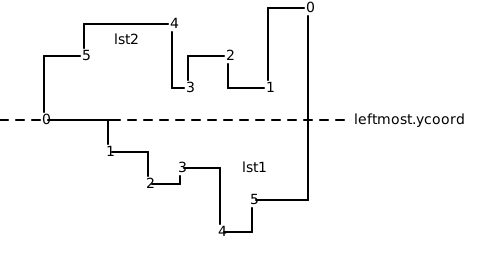
- Parameters:
lst (PointSet) – A list of points representing a point set
dir (Callable) – The dir parameter is a callable function that determines the direction in which the points are sorted. It can be either an x-first or y-first function
- Returns:
The function create_mono_rpolygon returns a tuple containing two elements: 1. PointSet: This is the list of points that make up the monotone rectilinear polygon. 2. bool: This boolean value indicates whether the polygon is clockwise or anticlockwise, depending on the dir parameter passed to the function.
- Return type:
Examples
>>> coords = [ ... (3, -3), ... (5, 1), ... (2, 2), ... (3, 3), ... (1, 4), ... ] ... >>> S = [Point(xcoord, ycoord) for xcoord, ycoord in coords] >>> _, is_anticlockwise = create_mono_rpolygon(S, lambda pt: (pt.xcoord, pt.ycoord), lambda a, b: a < b) >>> is_anticlockwise False
- physdes.rpolygon.create_test_rpolygon(lst)[source]
Create a test rectilinear polygon for a given point set.
The create_test_rpolygon function takes a point set as input and returns a test rectilinear polygon created from that point set.
- Parameters:
lst (PointSet) – The parameter lst is a PointSet, which is a collection of points. Each point in the PointSet has an xcoord and ycoord attribute, representing its coordinates
- Returns:
The function create_test_rpolygon returns a PointSet, which is a list of Point objects.
- Return type:
- physdes.rpolygon.create_xmono_rpolygon(lst)[source]
The function creates an x-monotone rectilinear polygon for a given point set.
- Parameters:
lst (PointSet) – A point set represented as a list of points. Each point has x and y coordinates
- Returns:
The function create_xmono_rpolygon returns a tuple containing two elements: a PointSet and a boolean value is_anticlockwise <– Note!!!
- Return type:
Examples
>>> coords = [ ... (-2, 2), ... (0, -1), ... (-5, 1), ... (-2, 4), ... (0, -4), ... (-4, 3), ... (-6, -2), ... (5, 1), ... (2, 2), ... (3, -3), ... (-3, -3), ... (3, 3), ... (-3, -4), ... (1, 4), ... ] ... >>> S = [Point(xcoord, ycoord) for xcoord, ycoord in coords] >>> _, is_anticlockwise = create_xmono_rpolygon(S) >>> is_anticlockwise True
- physdes.rpolygon.create_ymono_rpolygon(lst)[source]
The function creates a y-monotone rectilinear polygon for a given point set.
- Parameters:
lst (PointSet) – A point set represented as a list of points. Each point has x and y coordinates
- Returns:
The function create_ymono_rpolygon returns a tuple containing two elements: a PointSet and a boolean value is_clockwise <– Note!!!
- Return type:
Examples
>>> coords = [ ... (-2, 2), ... (0, -1), ... (-5, 1), ... (-2, 4), ... (0, -4), ... (-4, 3), ... (-6, -2), ... (5, 1), ... (2, 2), ... (3, -3), ... (-3, -3), ... (3, 3), ... (-3, -4), ... (1, 4), ... ] ... >>> S = [Point(xcoord, ycoord) for xcoord, ycoord in coords] >>> _, is_clockwise = create_ymono_rpolygon(S) >>> is_clockwise False
- physdes.rpolygon.partition(pred, iterable)[source]
Use a predicate to partition entries into true entries and false entries
Examples
>>> is_odd = lambda x: x % 2 != 0 >>> partition(is_odd, range(10)) ([1, 3, 5, 7, 9], [0, 2, 4, 6, 8])
- physdes.rpolygon.point_in_rpolygon(pointset, ptq)[source]
The function point_in_rpolygon determines if a given point is within a given RPolygon.
The code below is from Wm. Randolph Franklin <wrf@ecse.rpi.edu> (see URL below) with some minor modifications for rectilinear. It returns true for strictly interior points, false for strictly exterior, and ub for points on the boundary. The boundary behavior is complex but determined; in particular, for a partition of a region into polygons, each Point is “in” exactly one Polygon. (See p.243 of [O’Rourke (C)] for a discussion of boundary behavior.)
See http://www.faqs.org/faqs/graphics/algorithms-faq/ Subject 2.03
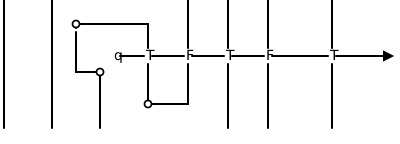
- Parameters:
pointset (PointSet) – The pointset parameter is a list of points that define the vertices of the RPolygon. Each point in the list is represented as a Point object, which has xcoord and ycoord attributes representing the x and y coordinates of the point, respectively
ptq (Point[int, int]) – ptq is a Point object representing the query point. It has two attributes: xcoord and ycoord, which represent the x and y coordinates of the point, respectively
- Returns:
a boolean value indicating whether the given point ptq is within the given RPolygon defined by the pointset.
- Return type:
Examples
>>> coords = [ ... (0, -4), ... (0, -1), ... (3, -3), ... (5, 1), ... (2, 2), ... (3, 3), ... (1, 4), ... (-2, 4), ... (-2, 2), ... (-4, 3), ... (-5, 1), ... (-6, -2), ... (-3, -3), ... (-3, -4), ... ] ... >>> S = [Point(xcoord, ycoord) for xcoord, ycoord in coords] >>> point_in_rpolygon(S, Point(0, 1)) False >>> point_in_rpolygon(S, Point(0, -4)) True >>> point_in_rpolygon(S, Point(-6, -2)) False >>> point_in_rpolygon(S, Point(0, 0)) False >>> point_in_rpolygon(S, Point(10, 10)) False
- physdes.rpolygon.rpolygon_is_convex(lst)[source]
Check if a rectilinear polygon is convex.
- Parameters:
lst (List[Point[int, int]]) – A list of points representing the vertices of the polygon.
- Returns:
True if the polygon is convex, False otherwise.
- Return type:
Examples
>>> from .point import Point >>> lst = [Point(0, 0), Point(0, 1), Point(1, 1), Point(1, 0)] >>> rpolygon_is_convex(lst) True >>> lst = [Point(0, 0), Point(0, 2), Point(1, 2), Point(1, 1), Point(2, 1), Point(2, 0)] >>> rpolygon_is_convex(lst) True
- physdes.rpolygon.rpolygon_is_monotone(lst, dir)[source]
Check if a rectilinear polygon is monotone in a given direction.
- Parameters:
- Returns:
True if the polygon is monotone, False otherwise.
- Return type:
Examples
>>> from .point import Point >>> lst = [Point(0, 0), Point(0, 1), Point(1, 1), Point(1, 0)] >>> rpolygon_is_monotone(lst, lambda p: (p.xcoord, p.ycoord)) True >>> lst = [Point(0, 0), Point(1, 1), Point(0, 1), Point(1, 0)] >>> rpolygon_is_monotone(lst, lambda p: (p.xcoord, p.ycoord)) False
- physdes.rpolygon.rpolygon_is_xmonotone(lst)[source]
Check if a rectilinear polygon is x-monotone.
- Parameters:
lst (List[Point[int, int]]) – A list of points representing the vertices of the polygon.
- Returns:
True if the polygon is x-monotone, False otherwise.
- Return type:
Examples
>>> from .point import Point >>> lst = [Point(0, 0), Point(0, 1), Point(1, 1), Point(1, 0)] >>> rpolygon_is_xmonotone(lst) True >>> lst = [Point(0, 0), Point(1, 1), Point(0, 1), Point(1, 0)] >>> rpolygon_is_xmonotone(lst) False
- physdes.rpolygon.rpolygon_is_ymonotone(lst)[source]
Check if a rectilinear polygon is y-monotone.
- Parameters:
lst (List[Point[int, int]]) – A list of points representing the vertices of the polygon.
- Returns:
True if the polygon is y-monotone, False otherwise.
- Return type:
Examples
>>> from .point import Point >>> lst = [Point(0, 0), Point(0, 1), Point(1, 1), Point(1, 0)] >>> rpolygon_is_ymonotone(lst) True >>> lst = [Point(0, 0), Point(1, 1), Point(0, 1), Point(1, 0)] >>> rpolygon_is_ymonotone(lst) True
- physdes.rpolygon.rpolygon_make_convex_hull(pointset, is_anticlockwise)[source]
Create the convex hull of a rectilinear polygon.
- Parameters:
- Returns:
A list of points representing the convex hull.
- Return type:
Examples
>>> from .point import Point >>> lst = [Point(0, 0), Point(1, 2), Point(2, 1)] >>> hull = rpolygon_make_convex_hull(lst, False) >>> len(hull) 3
- physdes.rpolygon.rpolygon_make_monotone_hull(lst, is_anticlockwise, dir)[source]
Create the x-monotone hull of a rectilinear polygon.
- Parameters:
- Returns:
A list of points representing the x-monotone hull.
- Return type:
Examples
>>> from .point import Point >>> lst = [Point(0, 0), Point(1, 2), Point(2, 1)] >>> hull = rpolygon_make_xmonotone_hull(lst, False) >>> len(hull) 3
- physdes.rpolygon.rpolygon_make_xmonotone_hull(lst, is_anticlockwise)[source]
Create the x-monotone hull of a rectilinear polygon.
- Parameters:
- Returns:
A list of points representing the x-monotone hull.
- Return type:
Examples
>>> from .point import Point >>> lst = [Point(0, 0), Point(1, 2), Point(2, 1)] >>> hull = rpolygon_make_xmonotone_hull(lst, False) >>> len(hull) 3
- physdes.rpolygon.rpolygon_make_ymonotone_hull(lst, is_anticlockwise)[source]
Create the y-monotone hull of a rectilinear polygon.
- Parameters:
- Returns:
A list of points representing the y-monotone hull.
- Return type:
Examples
>>> from .point import Point >>> lst = [Point(0, 0), Point(1, 2), Point(2, 1)] >>> hull = rpolygon_make_ymonotone_hull(lst, False) >>> len(hull) 3
physdes.rpolygon_cut module
Rectilinear Polygon Cutting Algorithms.
This module provides a set of functions for partitioning rectilinear polygons into convex components. This is a common operation in computational geometry and is used in various applications, such as VLSI physical design, computer graphics, and robotics.
The core functionality of this module is to take a rectilinear polygon, which may be concave, and decompose it into a set of smaller, convex rectilinear polygons. This is achieved by identifying concave vertices and introducing cuts to resolve the concavities.
The main functions provided are:
rpolygon_cut_convex(): A recursive algorithm that cuts a rectilinear polygon into convex pieces.
rpolygon_cut_explicit(): An alternative cutting algorithm that also produces convex partitions.
These functions are essential for simplifying complex polygon geometries, making them easier to process in downstream applications. The algorithms are designed to be robust and efficient, handling various polygon shapes and complexities.
- physdes.rpolygon_cut.find_min_dist_point(lst, vcurr)[source]
Finds the point in a polygon that is closest to a given vertex.
This function is a key helper for the polygon cutting algorithms. When a concave vertex is identified, this function is used to find the best vertex to connect it to, in order to create a cut that resolves the concavity. The “best” vertex is the one that is closest in either the horizontal or vertical direction.
The function iterates through the vertices of the polygon and calculates the Manhattan distance to the given vertex (vcurr). It keeps track of the minimum distance found and returns the vertex that corresponds to this minimum distance, along with a flag indicating whether the closest connection is vertical or horizontal.
- Parameters:
- Returns:
A tuple containing the closest vertex and a boolean indicating whether the connection is vertical (True) or horizontal (False).
- Return type:
- physdes.rpolygon_cut.rpolygon_cut_convex(lst, is_anticlockwise)[source]
Cuts a rectilinear polygon into a set of convex rectilinear polygons.
This function implements a recursive algorithm to partition a given rectilinear polygon into a set of convex components. The process begins by identifying a concave vertex in the polygon. Once a concave vertex is found, a cut is made to another vertex in the polygon, effectively splitting the polygon into two smaller polygons. This process is then applied recursively to the resulting polygons until all of them are convex.
The choice of the cut is critical for the efficiency and quality of the partitioning. This implementation uses the find_min_dist_point function to select a cut that connects the concave vertex to the nearest vertex in the polygon, which helps to create well-shaped partitions.
- Parameters:
- Returns:
A list of point sets, where each point set represents a convex rectilinear polygon.
- Return type:
Examples
>>> from .point import Point >>> lst = [Point(0, 0), Point(1, 2), Point(2, 1)] >>> hull = rpolygon_cut_convex(lst, False) >>> len(hull) 1
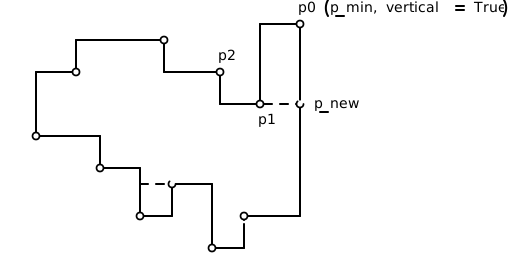
- physdes.rpolygon_cut.rpolygon_cut_explicit(lst, is_anticlockwise)[source]
Cuts a rectilinear polygon into a set of convex rectilinear polygons.
This function provides an alternative algorithm for partitioning a rectilinear polygon into convex components. Like rpolygon_cut_convex, it works by identifying concave vertices and introducing cuts to resolve them. The underlying logic for selecting cuts and performing the partitioning may differ, but the end result is the same: a set of convex rectilinear polygons.
This function can be used as a drop-in replacement for rpolygon_cut_convex. Depending on the specific geometry of the input polygon, one function may perform better than the other. Having both options provides flexibility for different use cases.
- Parameters:
- Returns:
A list of point sets, where each point set represents a convex rectilinear polygon.
- Return type:
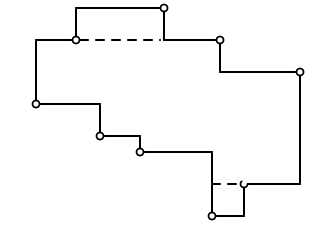
physdes.skeleton module
This is a skeleton file that can serve as a starting point for a Python
console script. To run this script uncomment the following lines in the
[options.entry_points] section in setup.cfg:
console_scripts =
fibonacci = physdes.skeleton:run
Then run pip install . (or pip install -e . for editable mode)
which will install the command fibonacci inside your current environment.
Besides console scripts, the header (i.e. until _logger…) of this file can
also be used as template for Python modules.
Note
This file can be renamed depending on your needs or safely removed if not needed.
References
- physdes.skeleton.main(args)[source]
Wrapper allowing
fib()to be called with string arguments in a CLI fashionInstead of returning the value from
fib(), it prints the result to thestdoutin a nicely formatted message.- Parameters:
args (List[str]) – command line parameters as list of strings (for example
["--verbose", "42"]).
Examples
>>> main(["1"]) The 1-th Fibonacci number is 1
- physdes.skeleton.parse_args(args)[source]
Parse command line parameters
- Parameters:
args (List[str]) – command line parameters as list of strings (for example
["--help"]).- Returns:
command line parameters namespace
- Return type:
Examples
>>> parse_args(["--version"]) Traceback (most recent call last): ... SystemExit: 0
physdes.to_polygon module
- physdes.to_polygon.to_polygon(rpolygon)[source]
The to_polygon function converts a rectilinear polygon to a standard polygon.
Examples
>>> from .point import Point >>> from .rpolygon import RPolygon >>> coords = [ ... (3, -3), ... (5, 1), ... (2, 2), ... (3, 3), ... (1, 4), ... ] >>> S = [Point(xcoord, ycoord) for xcoord, ycoord in coords] >>> P = RPolygon.from_pointset(S) >>> polygon = to_polygon(P) >>> polygon.signed_area_x2 10
physdes.vector2 module
Vector2 Class
This code defines a Vector2 class, which represents a two-dimensional vector in mathematics or physics. A vector is an object that has both magnitude and direction, typically represented by x and y coordinates in a 2D space.
The purpose of this code is to provide a reusable structure for working with 2D vectors, along with various operations that can be performed on them. This class can be used in applications like game development, physics simulations, or any scenario where 2D vector calculations are needed.
The Vector2 class takes two inputs when creating a new instance: x and y coordinates. These can be integers, floats, or even other Vector2 objects, allowing for flexible use in different contexts.
The class produces Vector2 objects as outputs, which can be printed, compared, or used in further calculations. It also provides methods for common vector operations like addition, subtraction, multiplication by a scalar, and division by a scalar.
To achieve its purpose, the Vector2 class uses Python’s object-oriented programming features. It defines several methods that overload standard operators (like +, -, *, and /), allowing vector objects to be manipulated intuitively. For example, you can add two vectors simply by using the + operator between them.
The class includes important logic flows for vector operations. Addition and subtraction are performed component-wise, meaning the x and y values are added or subtracted separately. Multiplication and division by a scalar apply the operation to both x and y components. There’s also a cross product method, which calculates a special type of multiplication between two vectors.
The Vector2 class also implements comparison operations, allowing vectors to be checked for equality. It provides a string representation of the vector for easy printing and debugging.
An interesting feature of this class is its use of generic types, allowing it to work with different numeric types (like integers or floats) or even nested Vector2 objects. This makes the class very flexible and usable in a wide range of scenarios.
Overall, this Vector2 class provides a comprehensive toolkit for working with 2D vectors, encapsulating the mathematical concepts and operations into an easy-to-use Python class. It's designed to be intuitive for beginners while also offering advanced features for more complex use cases.
- class physdes.vector2.Vector2(x, y)[source]
Bases:
Generic[T1,T2]- __add__(rhs)[source]
Adds this vector to another vector, returning a new vector.
This method adds the components of the rhs vector to the corresponding components of this vector and returns a new Vector2 object with the result.
- Parameters:
rhs (Vector2[T1, T2]) – The vector to add to this one.
- Returns:
A new Vector2 object representing the sum.
- Return type:
Vector2[T1, T2]
Examples
>>> v = Vector2(3, 4) >>> w = Vector2(5, 6) >>> print(v + w) <8, 10> >>> v3d = Vector2(v, 5) # vector in 3d >>> w3d = Vector2(w, 1) >>> print(v3d + w3d) <<8, 10>, 6> >>> v_nested = Vector2(Vector2(1, 2), 3) >>> w_nested = Vector2(Vector2(4, 5), 6) >>> print(v_nested + w_nested) <<5, 7>, 9>
- classmethod __class_getitem__(params)
Parameterizes a generic class.
At least, parameterizing a generic class is the main thing this method does. For example, for some generic class Foo, this is called when we do Foo[int] - there, with cls=Foo and params=int.
However, note that this method is also called when defining generic classes in the first place with class Foo(Generic[T]): ….
- __eq__(rhs)[source]
The __eq__ function checks if two instances of the Vector2 class are equal by comparing their x_ and y_ attributes.
- Parameters:
rhs (object) – The parameter rhs stands for “right-hand side” and represents the object that is being compared to the current object (self) in the __eq__ method
- Returns:
The __eq__ method returns a boolean value indicating whether the current object is equal to the rhs object.
- Return type:
Examples
>>> v = Vector2(3, 4) >>> w = Vector2(3, 4) >>> v == w True >>> v3d = Vector2(v, 5) # vector in 3d >>> w3d = Vector2(w, 6) # vector in 3d >>> v3d == w3d False >>> v_diff = Vector2(1, 2) >>> w_diff = Vector2(3, 4) >>> v_diff == w_diff False
- __iadd__(rhs)[source]
Performs in-place addition of another vector to this vector.
This method adds the components of the rhs vector to the corresponding components of this vector, modifying the vector in place.
- Parameters:
rhs (Vector2[T1, T2]) – The vector to add to this one.
- Returns:
The modified vector (self).
- Return type:
Vector2[T1, T2]
Examples
>>> v = Vector2(3, 4) >>> v += Vector2(5, 6) >>> print(v) <8, 10> >>> v3d = Vector2(v, 5) # vector in 3d >>> v3d += Vector2(v, 1) >>> print(v3d) <<16, 20>, 6> >>> v_nested = Vector2(Vector2(1, 2), 3) >>> v_nested += Vector2(Vector2(4, 5), 6) >>> print(v_nested) <<5, 7>, 9>
- __imul__(alpha)[source]
Performs in-place multiplication of this vector by a scalar.
This method multiplies both components of this vector by the scalar alpha, modifying the vector in place.
- Parameters:
alpha (float) – The scalar value to multiply the vector by.
- Returns:
The modified vector (self).
- Return type:
Vector2[T1, T2]
Examples
>>> v = Vector2(3, 4) >>> v *= 2 >>> print(v) <6, 8> >>> v3d = Vector2(v, 5) # vector in 3d >>> v3d *= 2 >>> print(v3d) <<12, 16>, 10> >>> v_nested = Vector2(Vector2(1, 2), 3) >>> v_nested *= 2 >>> print(v_nested) <<2, 4>, 6>
- __init__(x, y)[source]
The __init__ function initializes a Vector2 object with x and y coordinates.
- Parameters:
x (T1) – The x-coordinate of the vector. It represents the horizontal component of the vector in a 2D space
y (T2) – The parameter y represents the y-coordinate of the vector. It is used to specify the vertical component of the vector
Examples
>>> v = Vector2(3, 4) >>> print(v) <3, 4> >>> v3d = Vector2(v, 5) # vector in 3d >>> print(v3d) <<3, 4>, 5>
- __isub__(rhs)[source]
Performs in-place subtraction of another vector from this vector.
This method subtracts the components of the rhs vector from the corresponding components of this vector, modifying the vector in place.
- Parameters:
rhs (Vector2[T1, T2]) – The vector to subtract from this one.
- Returns:
The modified vector (self).
- Return type:
Vector2[T1, T2]
Examples
>>> v = Vector2(3, 4) >>> v -= Vector2(5, 6) >>> print(v) <-2, -2> >>> v3d = Vector2(v, 5) # vector in 3d >>> v3d -= Vector2(v, 1) >>> print(v3d) <<0, 0>, 4> >>> v_nested = Vector2(Vector2(5, 7), 9) >>> v_nested -= Vector2(Vector2(4, 5), 6) >>> print(v_nested) <<1, 2>, 3>
- __itruediv__(alpha)[source]
Performs in-place true division of this vector by a scalar.
This method divides both components of this vector by the scalar alpha, modifying the vector in place.
- Parameters:
alpha (float) – The scalar value to divide the vector by.
- Returns:
The modified vector (self).
- Return type:
Vector2[T1, T2]
Examples
>>> v = Vector2(6.0, 9.0) >>> v /= 2.0 >>> print(v) <3.0, 4.5> >>> v3d = Vector2(v, 5) # vector in 3d >>> v3d /= 0.5 >>> print(v3d) <<6.0, 9.0>, 10.0> >>> v_nested = Vector2(Vector2(2.0, 4.0), 6.0) >>> v_nested /= 2.0 >>> print(v_nested) <<1.0, 2.0>, 3.0>
- __mul__(alpha)[source]
Multiplies this vector by a scalar, returning a new vector.
This method multiplies both components of this vector by the scalar alpha and returns a new Vector2 object with the result.
- Parameters:
alpha (float) – The scalar value to multiply the vector by.
- Returns:
A new Vector2 object representing the product.
- Return type:
Vector2[T1, T2]
Examples
>>> v = Vector2(3, 4) >>> print(v * 2) <6, 8> >>> v3d = Vector2(v, 5) # vector in 3d >>> print(v3d * 2) <<6, 8>, 10> >>> v_nested = Vector2(Vector2(1, 2), 3) >>> print(v_nested * 2) <<2, 4>, 6>
- __neg__()[source]
The __neg__ function returns a new instance of the same type with the negated x and y values.
- Returns:
The __neg__ method returns a new instance of the same type as self, with the negated values of self.x and self.y.
- Return type:
Vector2[T1, T2]
Examples
>>> v = Vector2(3, 4) >>> print(-v) <-3, -4> >>> v3d = Vector2(v, 5) # vector in 3d >>> print(-v3d) <<-3, -4>, -5>
- __repr__()[source]
The __repr__ function returns a string representation of a Vector2 object, including the class name and its coordinates, which is useful for debugging.
- Returns:
The __repr__ method is returning a string representation of the Vector2 object.
- Return type:
Examples
>>> v = Vector2(3, 4) >>> repr(v) 'Vector2(3, 4)' >>> v3d = Vector2(v, 5) # vector in 3d >>> repr(v3d) 'Vector2(Vector2(3, 4), 5)'
- __rmul__(alpha)[source]
Multiplies a scalar by this vector, returning a new vector.
This method enables scalar * vector multiplication by delegating to the __mul__ method.
- Parameters:
alpha (float) – The scalar value to multiply the vector by.
- Returns:
A new Vector2 object representing the product.
- Return type:
Vector2[T1, T2]
Examples
>>> v = Vector2(3, 4) >>> print(2 * v) <6, 8> >>> v3d = Vector2(v, 5) # vector in 3d >>> print(2 * v3d) <<6, 8>, 10> >>> v_nested = Vector2(Vector2(1, 2), 3) >>> print(2 * v_nested) <<2, 4>, 6>
- __str__()[source]
The __str__ function returns a string representation of a Vector2 object in the format “<x, y>”.
- Returns:
The __str__ method is returning a string representation of the vector object.
- Return type:
Examples
>>> v = Vector2(3, 4) >>> print(v) <3, 4> >>> v3d = Vector2(v, 5) # vector in 3d >>> print(v3d) <<3, 4>, 5>
- __sub__(rhs)[source]
Subtracts another vector from this vector, returning a new vector.
This method subtracts the components of the rhs vector from the corresponding components of this vector and returns a new Vector2 object with the result.
- Parameters:
rhs (Vector2[T1, T2]) – The vector to subtract from this one.
- Returns:
A new Vector2 object representing the difference.
- Return type:
Vector2[T1, T2]
Examples
>>> v = Vector2(3, 4) >>> w = Vector2(5, 6) >>> print(v - w) <-2, -2> >>> v3d = Vector2(v, 5) # vector in 3d >>> w3d = Vector2(w, 1) >>> print(v3d - w3d) <<-2, -2>, 4> >>> v_nested = Vector2(Vector2(5, 7), 9) >>> w_nested = Vector2(Vector2(4, 5), 6) >>> print(v_nested - w_nested) <<1, 2>, 3>
- __truediv__(alpha)[source]
Divides this vector by a scalar, returning a new vector.
This method divides both components of this vector by the scalar alpha and returns a new Vector2 object with the result.
- Parameters:
alpha (float) – The scalar value to divide the vector by.
- Returns:
A new Vector2 object representing the quotient.
- Return type:
Vector2[T1, T2]
Examples
>>> v = Vector2(6.0, 9.0) >>> print(v / 2.0) <3.0, 4.5> >>> v3d = Vector2(v, 5) # vector in 3d >>> print(v3d / 2.0) <<3.0, 4.5>, 2.5> >>> v_nested = Vector2(Vector2(2.0, 4.0), 6.0) >>> print(v_nested / 2.0) <<1.0, 2.0>, 3.0> >>> print(v / -2.0) <-3.0, -4.5>
- cross(rhs)[source]
Calculates the 2D cross product of this vector with another vector.
The 2D cross product is a scalar value that is positive if rhs is to the “left” of this vector, negative if to the “right”, and zero if they are collinear.
- Parameters:
rhs (Vector2[T1, T2]) – The other vector to compute the cross product with.
- Returns:
The scalar value of the 2D cross product.
- Return type:
Examples
>>> v = Vector2(3, 4) >>> w = Vector2(5, 6) >>> v.cross(w) -2 >>> v_parallel = Vector2(3, 4) >>> w_parallel = Vector2(6, 8) >>> v_parallel.cross(w_parallel) 0 >>> v_positive = Vector2(1, 0) >>> w_positive = Vector2(0, 1) >>> v_positive.cross(w_positive) 1
- property x: T1
The function returns the x-coordinate of a vector.
- Returns:
The method x is returning the value of the attribute x_.
Examples
>>> v = Vector2(3, 4) >>> v.x 3 >>> v3d = Vector2(v, 5) # vector in 3d >>> print(v3d.x) <3, 4>
- x_: T1
- property y: T2
The function returns the y-coordinate of a vector.
- Returns:
The method y is returning the value of the y_ attribute.
Examples
>>> v = Vector2(3, 4) >>> v.y 4 >>> v3d = Vector2(v, 5) # vector in 3d >>> print(v3d.y) 5
- y_: T2